Solving One Step Equations Pixel Art



- Grades
- Grades 6–8
- File type
- Preparation
- Print ready


- Subject
- Algebra, Math
- Topic
- Matemaths, Algebra
- Resource types
- Activities
- Preparation
- Print ready
From the author
About this resource
Looking for an engaging and fun way to help your students practice one-step equations? Look no further than this exciting new game!
With no prep required, this digital activity allows students to practice their algebra skills while having fun and working towards a satisfying mystery picture reveal.
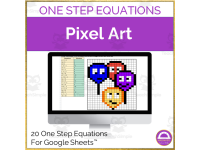
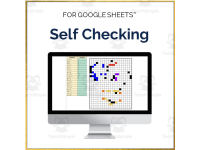
Designed for use with Google Sheets, this activity features 20 one-step equations for students to solve. As they correctly answer each question, a mystery picture will be revealed, showing four colourful balloons with smiley faces. The pixel art format of the picture makes it easy for students to self-check their answers, ensuring that they receive immediate feedback and can quickly identify and correct any mistakes they make.
The activity is suitable for use with students of all ages, but has been specifically designed with Grade 6 students in mind. As a sub-plan activity, it is easy to implement in the classroom, and its engaging format is sure to capture the attention of even the most reluctant students.
With its fun and interactive approach, this game is a great way to make algebra practice more enjoyable and rewarding for students. By combining problem-solving with a mystery picture reveal, it encourages students to engage with the material and work towards a concrete goal, helping them to stay motivated and focused throughout the activity.
Whether you're looking for a fun way to supplement your classroom lessons, or simply want to provide your students with an engaging and interactive activity that will help them to build their algebra skills, this game is the perfect choice. With its no-prep format, easy implementation, and engaging mystery picture reveal, it is sure to become a favourite among your students, and a valuable addition to your classroom resources.
Related resources
More resources teachers may find useful
More resources on the same subject and topic.



In the classroom
Teaching tips & learning objectives

Teaching tips
Open both links and take your own copy in Google Sheets before the lesson, since the download is the access page rather than the activity
Check that student accounts can reach the linked spreadsheet ahead of time - the whole task runs on screen, so there is no printable fallback in the download
Keep the second link teacher-side when the activity is set for independent, sub-cover or remote work
Because access runs through a link rather than a stored file, note the destination somewhere in your own planning folder so the activity can be found again next year

Skills covered
Solving one-step equations - the linked activity is titled "One Step Equations Pixel Art" and that single equation skill is what the picture reveal is built on.
Working in a spreadsheet - the activity opens in Google Sheets, so students enter their answers in cells on a device rather than writing on a printed page.
Good to know
Questions teachers ask about this resource
Where does the activity itself live once the download is open?
In Google Sheets. The download is a one-page access sheet headed "Google Sheets"; the pixel art activity and a separate Solutions file each open from the two entries listed under "Download Links:".
What does a class need in place before this can be set?
Student device access and Google Sheets. The task opens as a spreadsheet from the link rather than printing, which suits a computer-lab session, a one-to-one classroom or remote work.

No reviews yet
Downloaded this resource? Tell other teachers how it went.
Resource details
Concepts & topics
Core concepts
 Core concepts
One-step equations
 Topics
Explore more
Categories this resource belongs to
Explore related searches



More to explore