Fiction and Non-Fiction: Compare Text Features
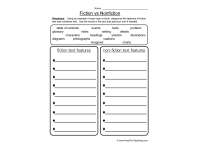
Sort the supplied text features into fiction and non-fiction, then add observations from books you choose.

- Grades
- Grades 2–4
- Pages
- 1
- File type


- Subject
- Reading, ELA
- Resource types
- Worksheets
- Ontario expectations
- C1.2 — identify
From the author
About this resource
This worksheet is a great way for students to practice identifying fiction and nonfiction features! It would be perfect for a literacy centre or small group activity.
Related resources
More resources teachers may find useful
More resources on the same subject and topic.


In the classroom
Teaching tips & learning objectives

Learning objectives
- Classify common features of fictional and informational texts
- Use example books to identify additional genre features

Teaching tips
- Place one fiction and one nonfiction book beside the sheet so students can find examples of the listed features.
- Discuss features that appear in both books, such as illustrations or a table of contents, instead of treating every feature as exclusive to one text type.

Skills covered
- Text-feature analysis — Sort structural and content cues
- Genre comparison — Contrast fiction with nonfiction

No reviews yet
Downloaded this resource? Tell other teachers how it went.
Ontario curriculum
Ontario curriculum expectations
Ontario expectations
 Ontario expectations
- C1.2 — identify and describe some characteristics of literary and informational text forms and their associated genres
Core concepts
 Core concepts
- Fiction features
- Nonfiction features
- Text structures
Explore more
Categories this resource belongs to
Explore related searches


More to explore