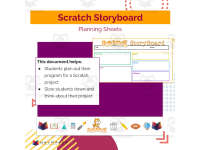
Scratch Storyboard Planning Sheet


- Grades
- Grades 4–6, Elementary, Middle School
- Pages
- 1
- File type
- Preparation
- Print ready


- Topic
- Creativity, Computational thinking
- Resource types
- Projects, Activities
- Preparation
- Print ready
Product description
From the author
Scratch Storyboard Planning Sheet: An Overview
Scratch Storyboard Planning Sheet is a well-rounded educational tool, primarily shaped for educators. With its conception revolving around nurturing creativity and computational thinking, it acts as an effective guide for structuring Scratch projects. It offers versatile use across different grade levels, ranging from Grade 1 to Grade 9.
In-depth Exploration of the Tool
This instructional document navigates students through their creative process by requiring them to:
- draw a picture,
- select characters and scenery,
- outline expected events and character interactions.
The tool's primary goal is to allow students to visualize each scene on paper before turning it into a digital form. This intentional deceleration resonates with boosting foresight and strong planning skills – vital in the realm of computer science.
Versatility & Flexibility
The Scratch Storyboard Planning Sheet facilitates learners' control over every stage of storyboard development. Whether incorporated into large class sessions, small group work or handed over as homework assignments - this product morphs effortlessly into various learning blueprints.
Catering Artistic Minds
An icing on the cake is that this resource bridges between artistic skills and coding – making it an absolute hit among young artists who can transform their hand-drawn designs into tangible storyboard plans further coded onto digital platforms!
Versatility Across Coding Platforms
A point worth standing out here is that despite being created majorly for Scratch, the paper planning sheet can also be adapted for other scene-based projects - marking its significant adaptability.
Eco-efficiency
The product's design ingeniously fits two scenes per sheet! This outlines the thoughtful construction around efficient paper use, also giving ample room necessary for detailed project planning. Therefore, educators can disperse as many sheets required based on individual project needs - without fretting over needless material usage.
Scene Planning Before Coding
In a nutshell, Scratch Storyboard Planning Sheet is invaluable in supporting scene planning before coding. It indeed sows the seeds of budding interest among young learners at different knowledge thresholds in the fascinating world of computer science!
Related resources
More resources teachers may find useful
24 related resources were found using this product's title, contributor, categories and tags.


In the classroom
Teaching tips & learning objectives

Learning objectives
Plan a Scratch scene before coding by deciding its backdrop, its characters and its event
Break down a scene's event into action, dialogue and a transition to the next scene
Order a multi-scene project using the Scene field across one or more sheets

Teaching tips
Have students complete the storyboard fully before opening Scratch, using the Transition space to decide how each scene passes to the next
Print one copy per two scenes — longer projects just take extra copies of the same sheet, kept in order by the Scene field
The Backdrop label matches Scratch's own stage vocabulary, so students can carry their planned backdrops and characters straight into the editor when they start building

Skills covered
Project planning — students map each Scratch scene's backdrop, characters and event on paper before building it.
Narrative structure — every scene frame separates its event into action, dialogue and transition.
Sequencing — the Scene field orders frames so a multi-scene story reads in order across sheets.

No reviews yet
Downloaded this resource? Tell other teachers how it went.
Resource details
Concepts & topics
Core concepts
 Core concepts
Storyboarding
Scratch programming
Project planning
 Topics
Explore more
Categories this resource belongs to
Explore related searches
More to explore
You may also like