Emoji Rubric Template (Editable in Google Docs)



- File type
- Google Docs
- Editable
- Yes


- Subject
- Resources for Teachers
- Topic
- Emoj Rubric, Rubric Template
- Resource types
- Templates
- Editable
- Yes
From the author
About this resource
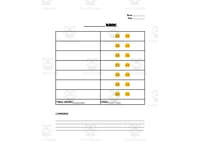
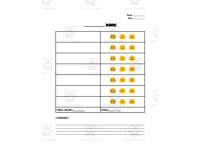
This seven-page PDF contains five blank emoji rubric templates, plus a cover and Google Docs copying directions. Three category layouts offer two, three or four emoji choices with grade, total and comments fields. Two project layouts use four-level grids.
Write your criteria on the printed rubrics or customise a copy of the linked Google Doc.
Related resources
More resources teachers may find useful
More resources on the same subject and topic.



In the classroom
Teaching tips & learning objectives

Teaching tips
Make your own copy of the linked Google Doc (File > Make a copy while signed in) before typing — the shared original is read-only
Keep a printed stack of the blank version for quick handwritten rubrics when an assignment comes up mid-unit
Match the layout to the assignment weight: the file lists category versions worth 2, 3, and 4 points, so pick the point scale that fits your total
Use the lined comments block to pair the emoji score with one written next-step note per student
Good to know
Questions teachers ask about this resource
How do I get a version I can type into?
The directions page links a read-only Google Doc; while signed in to a Google account, choose File and then Make a copy to save your own version, then type your criteria into the copy. The PDF pages can also simply be printed and filled in by hand.
What point scales do the rubric layouts use?
The package list names category layouts worth 2, 3, and 4 points, plus two versions built for project-based learning, and every layout leaves the criteria blank for the teacher to define.

No reviews yet
Downloaded this resource? Tell other teachers how it went.
Resource details
Concepts & topics
Core concepts
 Core concepts
Marking rubrics
Assessment templates
Teacher feedback
 Topics
Explore more
Categories this resource belongs to
Explore related searches


More to explore