



Unfinished Work Folder Labels



- Year groups
- Nursery, Reception, Years 1–4
- Pages
- 4
- File type
- Preparation
- Print ready


- Subject
- Resources for Teachers
- Topic
- Work Folders, Folder Labels
- Preparation
- Print ready
From the author
About this resource
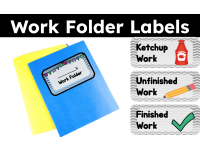
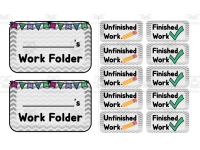
This is a Work Folder Label Set. This file comes as a PDF with four label pages plus a cover. Status sheets print 10 labels per page, can use Avery labels or regular paper and then glue or tape to folders.
Folders can be laminated.
It comes with 3 different labels:
1. Ketchup Work
2. Unfinished Work
3. Finished Work
The grey status labels print ten per page; name labels print two per page.
Related resources
More resources teachers may find useful
More resources on the same subject and topic.


In the classroom
Teaching tips & learning objectives

Teaching tips
Print the name label sheet and write each student's name on the blank line before printing the status labels, since page 2 provides exactly two name labels per sheet.
Cut the label sheets apart along the repeating grid before attaching them, since each status label prints ten to a page in fixed rows and columns.
Use the sample page as a printing reference — it shows one full-size copy of each of the three label designs before the repeating sheets print.

Skills covered
Classroom folder organisation — teachers apply the printed status labels (Ketchup Work, Unfinished Work, Finished Work) to sort each student's ongoing assignments into the correct folder.
Folder personalisation — teachers write a student's name on the blank line of the “___’s Work Folder” label before attaching it to a folder.
Good to know
Questions teachers ask about this resource
How are the name labels formatted differently from the status labels?
The name labels print two to a page with a blank line for writing “___’s Work Folder,” while the status labels — Ketchup Work, Unfinished Work, and Finished Work — print ten to a page for repeated use across many folders.

No reviews yet
Downloaded this resource? Tell other teachers how it went.
Resource details
Concepts & topics
Core concepts
 Core concepts
Classroom organisation
Work folder labels
 Topics
Explore more
Categories this resource belongs to
Explore related searches



More to explore


