search
user.png
vertical menu

Debugging (Unplugged Coding #6)

Debugging (Unplugged Coding #6) preview
Debugging (Unplugged Coding #6) preview 2

Debugging (Unplugged Coding #6) preview 3
Debugging (Unplugged Coding #6) preview 4

Look Inside · 9 pages · answer key included

Unplugged coding debugging cover featuring sample Book Collection and Going to School code activities
Cover of the unplugged debugging resource
Resource overview lists debugging and command information, eight puzzles, and an answer key for each puzzle
Resource overview and contents
Debugging introduction defines bugs and fixing code, with hot stove and walking into doors examples
Debugging definition and real-life examples
Command reference explains moving right, left, up, down, and picking up; also lists start, stop, and loops
Command reference for the debugging puzzles
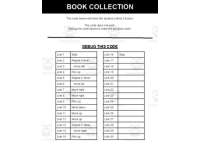
Book Collection debugging puzzle asks students to fix movement, repeat, and pick-up code to collect three books
Book Collection code to debug
Book Collection movement map shows a student and five book stacks for the code puzzle to collect three books
Movement map for the Book Collection puzzle
Going to School debugging puzzle asks students to fix code so a bus picks up students and travels to school
Going to School code to debug
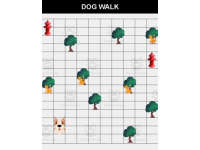
Going to School movement map shows a bus, two students to pick up, and the school destination for the code puzzle
Movement map for the Going to School puzzle

Answer key included

Answer key included
Attributes
Types

Activities

File

PDF

Editable
No
Author
Roombop
Rating
Add To Collection
Add to collection Add to collection

About This Product

You want to introduce or teach your students about programming / coding however you don’t have access to computers? No problem. This “Unplugged Coding” resource works without computers. After completing these printable activities, your students can apply similar logic and strategies to coding websites and apps. This is a great alternative or additionally resource before using code.org or Scratch.


This resource is apart of an unplugged coding series. In each, a different main concept is focused on. To use this resource, just print the PDF and have your students coding, unplugged today.

The main focus of this resource is debugging. The purpose is to make students understand that errors and mistakes occur in code. This is normal and the code can be corrected. This resource includes the following type of activities and worksheets:

  • Debugging Information page.

  • Commands information page. The students use this page to understand how to debug the code. All the code includes basic logic, if / else, and loops.

  • 8 Puzzles with code that needs to be debugged

  • Each of the 8 contains an answer key

These debugging challenges increase in difficulty.

What's Included

Debugged coding activity

0 Reviews

Explore related searches
you may also like...

Check out these other great products