How to Write a Paragraph: Revising Your Paragraph & Things to Watch for When You Revise - Google Slides Gr. 5-8



- Grades
- Grades 5–8, Elementary, Middle School
- File type
- Preparation
- Print ready


- Subject
- ELA, Writing
- Topic
- Google Classroom, graphic organizers
- Resource types
- Presentations, Teacher Tools
- Preparation
- Print ready
About this resource
What's inside this resource
How to Write a Paragraph: Revising Your Paragraph & Things to Watch for When You Revise - Google Slides Gr. 5-8 is a comprehensive teaching resource designed for grade 5-8 students. This product is equally beneficial for public school teachers and homeschoolers, with its primary focus on enhancing writing skills by breaking down the fundamental elements of writing a paragraph.
This interactive educational tool introduces the chapter "Revising Your Paragraph & Things to Watch For When You Revise" from 'How to Write a Paragraph.' Its main objective is to aid learners in effectively putting their thoughts into clear sentences and coherent paragraphs – an essential literacy skill that builds over time.
- This resource can be used in various learning settings including whole group discussions, collaborative small group writing sessions or even as individual homework assignments.
- This material adheres to State Standards and aligns closely with Bloom's Taxonomy guidelines; it serves as a strategic roadmap designed specifically for fostering students' cognitive growth.
Besides theoretical knowledge, this meticulously curated content offers valuable insights into the nuances of revising written work—an important facet of becoming proficient writers.
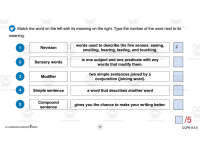
A notable feature of this product:- Digitalized on Google Slides that permits remote education capabilities – proves particularly beneficial during distance learning situations. It includes 25 interactive slides infused with reading passages, comprehension questions, engaging drag-and-drop activities where students can answer directly on their device then send back exercises for marking.
- A step-by-step guide exclusively devised for educators detailing how they can efficiently utilize Google Slides within their classrooms hence augmenting user-friendly experiences.
- An Answer Key that corresponds impeccably with the set tasks within the Google Slide document—facilitating seamless grading opportunities.
Important note: Ideally, teachers should have access to 'Google Classroom' along with Google Slides for maximizing the resource's potential.
This flagship teaching aid primarily focuses on the elements of writing and is part of Language Arts. It comes in a PDF file format and can be accessed directly via Google Classroom. A single purchase opens up a rich trove of learning merging technology, innovation, and education to revolutionize the learning experience for grades 5 to 8.
Related resources
More resources teachers may find useful
24 related resources were found using this product's title, contributor, categories and tags.

In the classroom
Teaching tips & learning objectives

Learning objectives
- Combine two short sentences with a conjunction such as so or but
- Explain what to look for when revising a paragraph

Skills covered
- Revision vocabulary — matching rubric, rest, review and drafting to their meanings
- Sequencing — ordering steps on the slides

No reviews yet
Downloaded this resource? Tell other teachers how it went.
Resource details
Concepts & topics
Core concepts
 Core concepts
- Revision
- Sentence combining
- Rubric
- Writing process
 Topics
Explore more
Categories this resource belongs to
Explore related searches
More to explore
You may also like