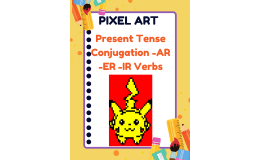
Pixel Art: Present Tense -AR -ER -IR Conjugations


- Grades
- Not Grade Specific
- File type
- Google Sheets


- Subject
- Foreign Languages, Spanish
- Topic
- pixel art, spanish present tense
- Resource types
- Activities
About this resource
What's inside this resource
Spice up your Spanish class with an engaging and interactive activity that allows students to practice the Present Tense -AR -ER -IR Spanish Conjugations using Google Sheets.
This self-checking activity includes a 1-page Google Sheet with 15 verbs, such as mirar, estudiar, amar, cantar, hablar, vender, comer, beber, correr, temer, abrir, recibir, describir, compartir y dividir.
The best part? The activity is designed in a way that students enter their answers in the answer column and if the answers are correct, the image starts to appear piece by piece.
What's more, colors do not appear for incorrect answers, providing immediate feedback and promoting self-correction.
With the option to assign each student a copy of the paperless activity through Google Classroom, Canvas, or Schoology, you can easily integrate technology into your teaching and create an interactive learning experience for your students. Don't miss out on this fantastic opportunity to engage your students while reinforcing their Spanish conjugation skills!
★ Simple Steps
1. Create two copies of the Google Sheets (one for yourself as your answer key and the other is the one you share with your students.
2. Do not forget to delete answers in the "answer" columns before sharing with students.
Related resources
More resources teachers may find useful
24 related resources were found using this product's title, contributor, categories and tags.

In the classroom
Teaching tips & learning objectives

Learning objectives
- Conjugate regular -ar, -er and -ir verbs in the present tense

Teaching tips
- Make two copies of the sheet: keep one as your answer key, and clear the answer column in the other before sharing it with students.

Skills covered
- Self-correction — checking each typed answer against whether the picture fills in and revising answers that leave squares blank

No reviews yet
Downloaded this resource? Tell other teachers how it went.
Resource details
Concepts & topics
Core concepts
 Core concepts
- Present tense
- Regular -ar, -er and -ir verbs
- Verb conjugation
Topics
 Topics
Explore more
Categories this resource belongs to
Explore related searches
More to explore
You may also like