


Scratch Halloween: Ghost Game
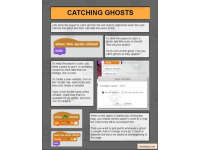
Halloween coding project in Scratch, with numbered steps for building a game where players catch ghosts with the mouse cursor, from animating the ghost sprite to adding a timer.


- Grades
- Grades 3–10, Elementary, Middle School, High School
- File type
- Preparation
- Print ready


- Subject
- Science, Technology, Computer Science
- Topic
- scratch, scratch programming
- Resource types
- Games, Activities
- Preparation
- Print ready
About this resource
What's inside this resource
Scratch Halloween: Ghost Game is a programming activity that teaches students how to code a spooky video game using Scratch. Students create an interactive game where they catch ghosts with their mouse cursor. The step-by-step tutorial guides learners of all abilities through building core coding concepts like variables, conditionals, events, and more. Educators can implement this resource in many ways - assign it to individuals or small groups for self-paced learning, use it for whole class computer lab instruction, or even flip the classroom by assigning it as pre-learning before a programming lesson. This engaging and seasonal activity is adaptable for elementary through high school students learning coding fundamentals or looking to advance their Scratch skills by designing their own creative variations after completing the tutorial.
Related resources
More resources teachers may find useful
24 related resources were found using this product's title, contributor, categories and tags.

In the classroom
Teaching tips & learning objectives

Learning objectives
- Animate a sprite in Scratch
- Use random positions and a timer in a game
- Detect when the mouse cursor touches a sprite

Teaching tips
- The steps assume students already know their way around the Scratch editor

Skills covered
- Event-driven coding — making a ghost respond when the mouse catches it
- Randomization — placing ghosts at random positions
- Extending a project — adding features once the base game works

No reviews yet
Downloaded this resource? Tell other teachers how it went.
Resource details
Concepts & topics
Core concepts
 Core concepts
- Scratch
- Sprites
- Randomization
- Timers
- Collision detection
 Topics
Explore more
Categories this resource belongs to
Explore related searches
More to explore
You may also like


Games, Activities


Games, Activities


Games, Activities