Video Games Reading Comprehension Passage - Cored Ed Encyclopedia




ELA, Language Development, Reading Comprehension, Reading, Pre-Reading, Science, Technology, Engineering, History, Social Studies
Worksheets & Printables, Worksheets, Teacher Tools, Centers, Activities, Writing Prompts, Assessments, Quizzes and Tests, Quizzes, Lesson Plans


About This Product
This video games reading comprehension with lesson plan includes:
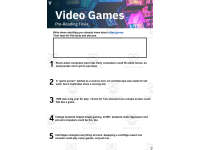
Visualization (on the front cover)
Start your lesson by taking a minute to think and share something about the topic.
Read the script aloud (slowly), perhaps prepare some music or sound effects. Student close their eyes and let their imaginations wander.
Students open their eyes, read the question aloud and give them a few minutes to complete. Ask a few students to share or keep answers until the end to compare with what they learn in the passage.
Quick pause—thousands of Cored Education products are included with your TeachSimple membership.
Download links and encyclopedia index available here.
Pre-Reading Trivia
Students will write down one thing they already know about the subject and then read five more facts and discuss. These facts are fun, and the students will enjoy learning about the subject before reading more.
Give 1 minute for students to write what they already know (no pressure—best guess is fine).
Read the five facts together. After each fact, do ask a student for their opinion, was it surprising?
Set a purpose by asking students to highlight/underline one fact they want to learn more about during the reading.
Reading Passage
The text is a high-interest reading passage with set paragraphs, roughly three to four paragraphs long. It contains a variety of themes about the topic, anywhere from history to technology. The passage is between 250 and 350 words in length.
First, ask students to look at the headings and see what they’ll learn about today. What do they know about the topic/heading?
First read options:
Teacher read-aloud (best for support).
Partner reading (paragraph by paragraph).
While reading, students underline important details, and vocabulary words they think may come up in the questions section.
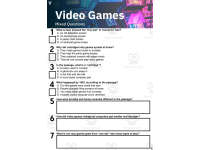
Mixed Questions
The first question page contains four multiple-choice questions, each with a choice of four answers, and three written response questions that require a sentence or two from the student.
Students complete the mcqs first independently, then review quickly as a class.
For the 3 written responses, try to get students giving the answer with some form of evidence:
“I think ___ because the text says ___.”
If students get stuck, send them back to check the passage.
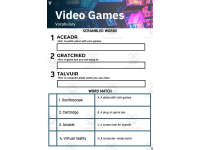
Vocabulary Questions
Practice seven key words from the text in this section across two activities. First section is scrambled words where students will unscramble three words given a clue for each. The second section is a word to meaning matching activity.
Before starting, have some students read out words they underlined in the passage. Ask students to say the word and read aloud the sentence(s) around each word.
Ask students to do scrambled words and the matching exercise in pairs then go through answers as a class.
For the scrambled spelling task, get four pairs to come up to the board and write the words for extra practice with the other student reading out the clue.
For the matching task, prompt students to give full sentences: “I matched ___ with ___ because ___.”
Creative Writing
In this question, the student will be required to write a five to eight sentence paragraph on a question related to the topic.
Before starting, ask students write down 3 key ideas they are going to include in their piece. Ask students for ideas to share around the class to help those struggling.
Pro writing expectations:
5–8 sentences
At least 2 facts or details from the passage
At least 2 vocabulary words from the previous page
Students read their paragraphs while classmates listen for facts and vocabulary words.
Extension Activities
This page is optional for fast finishers or to take home. There are several activities, each one requiring a different skill. Do some, do none, do all, completely optional - but you will feel reassured knowing every possibility is planned for. Includes summary writting question.
Answer Key
There are answers for the multiple-choice questions, written response questions have sample answers, vocabulary answers and if there is a summary question then a sample summary will be provided as well.
Lesson Plan Included
Customized lesson plan for this lesson is included.
Lesson Snapshot
Title: Video Games
Genre: Nonfiction (Informational text)
Subject: Science & Technology / Media Literacy
Primary Topic: How video games changed from dots to VR
Estimated Guided Reading Level (A–Z): P
Story text location: Reading Passage on page 3.
Support pages included: Visualization prompt (p.1), Pre-Reading Trivia (p.2), Mixed Questions (p.4), Vocabulary (p.5), Creative Writing (p.6), Extension Activities (p.7), Answers (p.8).
Support-page QA check: The questions, vocabulary tasks, and answer key match the passage’s details (dates, examples, and key terms).
What This Lesson Teaches Best
Early video games grew from science tools and big computers: Describes room-sized computers and a “game screen” idea using an oscilloscope.
Timeline of key early games and places: Connects Tennis for Two (1958), Spacewar! at MIT (1962), Computer Space (1971), and Atari’s Pong (1972).
How cartridges changed home gaming: Explains that swapping cartridges let one system play many different games, and names early cartridge consoles (Fairchild system, Atari 2600).
Technology improvements changed how games look, sound, and where they are played: Notes smoother movement, clearer pictures, richer sound, and games moving to handheld screens, computers, consoles, and phones.
Games became many types of experiences: Lists examples like puzzles, team sports, building sets, long stories with choices, and virtual reality.
Learning Goals
Students will describe how Tennis for Two worked and what device showed the moving dot.
Students will identify major milestones in early video game history by placing key examples in order.
Students will explain how cartridges helped video games spread at home.
Students will summarize how video games changed as computers became smaller and stronger.
Students will give examples of different kinds of games mentioned in the passage.
Key Vocabulary From the Text
oscilloscope — a screen tool that can show moving signals.
physicist — a scientist who studies matter and energy.
arcades — public places where people play games.
cartridges — plastic game boxes you swap into a system.
virtual — computer-made, not physically real.
FULL CATALOG OF DOWNLOAD LINKS AND ENCYCLOPEDIA INDEX HERE
Resource Tags
0 Reviews
Check out these other great products