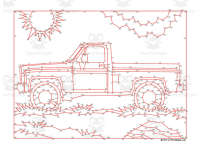
Pickup Truck Extreme Difficulty Dot-to-Dot / Connect the Dots PDF


- Year groups
- Years 4–6 (Key Stage 2)
- Pages
- 2
- File type
- Answer key
- Included


- Subject
- Numbers, Maths
- Topic
- Truck, Car
- Resource types
- Dot To Dots
- Answer key
- Included
From the author
About this resource
Connect the dots to uncover the picture of a pickup truck. This engaging dot-to-dot activity includes 563 dots to connect, ensuring that your students will be occupied for a substantial amount of time. Incorporate this enjoyable and challenging task into a lesson about trucks, cars, automobiles, and other vehicles.
You can print this dot-to-dot activity for your classroom and use it year after year.
Dot-to-dot activities offer numerous educational benefits. They help improve hand-eye coordination, fine motor skills, and concentration. Additionally, they aid in the development of number sequencing and counting skills. As students connect the dots, they also enhance their ability to follow instructions and practice patience and perseverance. This engaging activity provides a fun and interactive way to reinforce these important skills in a classroom setting.
Created by Tim van de Vall. Copyright Tim’s Printables LLC. Terms of use - for personal and educational purposes only.
Dot-to-Dot activity on page 1. Answer key on page 2. Page dimensions: 8.5”x11”. PDF format.
Related resources
More resources teachers may find useful
More resources on the same subject and topic.


In the classroom
Teaching tips & learning objectives

Learning objectives
Follow a very long numerical sequence without skipping markers
Scan across a dense page while maintaining the current position

Teaching tips
Use a movable index card to isolate one region of the page at a time, keeping the last connected number visible before searching onward.

Skills covered
Advanced sequencing — Continue ordered labels through the hundreds
Spatial search — Shift accurately among crowded regions

No reviews yet
Downloaded this resource? Tell other teachers how it went.
Resource details
Concepts & topics
Core concepts
 Core concepts
Truck dot to dot
Extreme number sequence
Visual persistence
 Topics
Explore more
Categories this resource belongs to
Explore related searches



More to explore