Pixel Pics Spreadsheet Activity: Food Edition



- File type
- Microsoft Excel
- Editable
- Yes


- Subject
- Science
- Topic
- Lab Llama, Computer Skills
- Resource types
- Activities
- Editable
- Yes
From the author
About this resource
Whether students are in the classroom or in the computer lab, you may be on the hunt for some computer skills resources that you know students will love. Many of our students, young and old, enjoy putting their tech skills to use. It is always impactful when we can give them opportunities to show what they know and/or teach them new things!
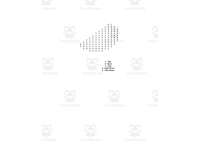
This is a Pixel Pics Spreadsheet Activity. It is the Food Edition.
This activity would work for any age of students who have learned about different computer applications, including Microsoft Excel.
Students will be given access to 1 spreadsheet. On this spreadsheet, there are 5 tabs. Students can complete all 5 tabs, you can assign which tabs you want them to complete, or you can let the students choose which ones to complete.
The tabs include:
-Cheeseburger
-Watermelon
-Strawberry
-Popsicle
-Happy Ice Cream
On each tab, students will follow the colour code to complete the picture.
Here are more resources to enjoy in my store:
https://teachsimple.com/product/excel-stories-pirate-edition-computer-science-project
https://teachsimple.com/product/excel-stories-detective-edition-computer-science-project
https://teachsimple.com/product/finger-placement-practice-teaching-typing-lesson
https://teachsimple.com/product/spot-the-differences-activity
Check out many more resources at my storefront here: https://teachsimple.com/contributor/lab-llama-computer-skills-resources
I can be contacted for questions and concerns at [REDACTED-EMAIL].
Related resources
More resources teachers may find useful
More resources on the same subject and topic.


In the classroom
Teaching tips & learning objectives

Learning objectives
Apply fill colour to cells by following a colour-number key
Move between the workbook's sheet tabs to complete each picture
Good to know
Questions teachers ask about this resource
Which programs will open the workbook?
Microsoft Excel and Google Sheets both work, so students need a device with one of them.

No reviews yet
Downloaded this resource? Tell other teachers how it went.
Resource details
Concepts & topics
Core concepts
 Core concepts
Spreadsheet cells
Fill colour
Pixel art
 Topics
Explore more
Categories this resource belongs to
Explore related searches


More to explore