Area and Perimeter: Build a Zoo Activity



- Grades
- Grades 2–5
- Pages
- 9
- File type
- Multiple File Types
- Editable
- Yes


- Subject
- Math, Geometry
- Topic
- Area Activity, Perimeter Activity
- Resource types
- Worksheets, Activities, Projects
- Editable
- Yes
- Standards
- 3. MD.D.8
Product description
From the author
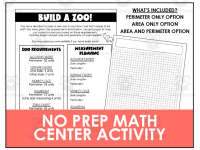
If you are looking for math activities that are designed to let your students get silly and run with their fun ideas, look no more! This is an Area and Perimeter: Build a Zoo Activity that will grow math skills as the creative juices flow. This is a no prep math center activity that is great for 2nd – 5th grade students.
What You Get:
-- Build a Zoo Perimeter Only Option
-- Build a Zoo Area Only Option
-- Build a Zoo Area and Perimeter Option
-- Google Slides Option for Digital Zoo
How To Use the Build a Zoo Activity:
You have decided to open a new zoo in your town, but first it needs to be built! You were given the requirements listed. Use grid paper to map out a plan for your zoo based on these requirements. Find the length of each side and perimeter of each exhibit. You may add your own exhibits if you have extra room!
The Area and Perimeter: Build a Zoo Activity makes an excellent math center activity! Whether students have mastered these skills or are just getting started in learning about them, this activity is interactive enough for all students to dive in. One page in your PDF will have a link to a Google Slides presentation. Use these digital Google Slides to have your students build a digital zoo. This is a great alternative for distance learning classrooms, classrooms with 1-to-1 devices, and those who want to save paper.
I hope you enjoy!
Here’s A Look at Some of My Best Sellers:
You Can Find My Store Front Here: Blooming with Blake
1 PDF with 5 usable pages and a Google Slides link
Related resources
More resources teachers may find useful
24 related resources were found using this product's title, contributor, categories and tags.

In the classroom
Teaching tips & learning objectives

Learning objectives
Students will determine side lengths for a rectangular exhibit that satisfy a given perimeter (e.g., a perimeter of 30 units for the alligator exhibit).
Students will calculate the perimeter and/or area of a rectangle from given side lengths (e.g., an elephant exhibit with sides of 4 and 7 units).
Students will apply given partial information (e.g., one side of 4 units and a perimeter of 12 units for the aquarium) to solve for a missing dimension.

Teaching tips
Choose the answer columns that fit your lesson. Even the area-only recording version supplies perimeter constraints, so students still need perimeter reasoning to find some side lengths.
For exhibits that give only a target perimeter (alligator, monkey cage, zebra) rather than fixed side lengths, remind students that more than one correct rectangle shape is possible — this is intentionally open-ended.
Use the digital Google Slides version for 1-to-1 or distance-learning classrooms, since it lets students insert shapes and add measurements without printing.

Skills covered
Perimeter calculation and design — finding side lengths that produce a target perimeter, or calculating perimeter from given side lengths.
Area calculation — finding the area of a rectangular exhibit from its side lengths.
Applying measurement to a design task — translating numeric constraints into a grid-paper or digital zoo layout.
Good to know
Questions teachers ask about this resource
What are the three worksheet versions, and how do they differ?
A Perimeter Only version, an Area Only version, and a combined Area and Perimeter version — all use the same five zoo exhibits and requirements, but each asks students to solve for a different measurement.
How does the digital Google Slides version work?
Students insert shapes to design the layout of their zoo, and can add images and measurements to each exhibit.
1 review
amazing
Curriculum
Standards, concepts & topics
Standards
 Standards
- 3. MD.D.8 — Solve real world and mathematical problems involving perimeters of polygons, including finding the perimeter given the side lengths, finding an unknown side length, and exhibiting rectangles with the same perimeter and different areas or with the same area and different perimeters.
Core concepts
 Core concepts
Perimeter
Area
Rectangles
Measurement
 Topics
Explore more
Categories this resource belongs to
Explore related searches
More to explore
You may also like