Parking Space for Electronic Devices – Sign for Cell Phone, Smartwatch



- Grades
- Grades 9–10, Middle School, Homeschool Templates, Homeschool Resources, Elementary, Not Grade Specific, High School
- Pages
- 10
- File type
- Multiple File Types
- Answer key
- Included


- Subject
- Common Core, Foreign Languages, Life Studies, Coaching, Classroom Management, Resources for Teachers, Special Resources, Social Emotional Learning (SEL), Math, STEM
- Topic
- Custom classroom materials, Rules
- Resource types
- Activities, Classroom Decor, Bulletin Boards, Posters, Teacher Tools, Templates, Word Walls, Banners, Quizzes and Tests, Tests
- Answer key
- Included
Product description
From the author
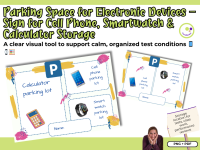
Parking Space for Electronic Devices – Sign for Cell Phone, Smartwatch & Calculator Storage
A clear visual tool to support calm, organized test conditions 📱⌚🧮
PNG + PDF
During tests or other formal assessments, it’s often necessary for students to put away their electronic devices—phones, smartwatches, or even calculators. But in practice, that can lead to a lot of back-and-forth: “Whose phone is this?”, “I thought mine was there,” or worse—accusations of missing or switched devices.
To avoid confusion and keep things fair and smooth, I created a Parking Space sign for electronic devices—with a designated spot for each student’s name. This way, students know exactly where to place their devices before the test begins. And after the assessment, everyone picks up their own device from the correct spot. No guessing, no mix-ups, no stress.
What’s included:
A visual sign for electronic device storage
Space for labeling with student names
Designed for phones, smartwatches, calculators, or other personal tech
File formats: PDF and PNG
Ready to print and use
How I use it in class:
Before a test, I simply remind my students: “Please park your devices.” They place their phones, watches, or calculators in the designated space and write their name on a sticky note or on the sign itself (depending on the setup). After the assessment, they collect their items—orderly and without confusion.
It’s a small routine, but it helps create a more focused testing environment and reduces the risk of distractions or misunderstandings. The visual sign makes the rule clear and easy to follow—especially for younger students or classes where digital boundaries are still being practiced.
Whether you use it during quizzes, exams, or quiet work phases, this sign can be a helpful addition to your classroom routines.
Best,
Heike from Lernfitness
Did You Know?
I teach with a certified therapy dog, and together we create a positive and welcoming learning environment. 🐶
Related resources
More resources teachers may find useful
24 related resources were found using this product's title, contributor, categories and tags.


In the classroom
Teaching tips & learning objectives

Teaching tips
Post or place the sign where students can reach it before a test or performance check begins, so devices are set aside before assessment starts.
Have students write their name on the sign next to their device's slot to avoid mix-ups when devices are returned.
Print or laminate the sign for repeated use as a standing classroom station rather than a one-time printout.

Skills covered
Classroom device management — the teacher posts a labeled storage sign so students place cell phones, calculators, or smartwatches in a named slot during assessments.

No reviews yet
Downloaded this resource? Tell other teachers how it went.
Resource details
Concepts & topics
Core concepts
 Core concepts
Classroom device management
Test-time device storage
 Topics
Explore more
Categories this resource belongs to
Explore related searches
More to explore
You may also like