search
user.png
vertical menu

Scratch: Pausing (Game Mechanics #5)

Scratch: Pausing (Game Mechanics #5) preview
Scratch: Pausing (Game Mechanics #5) preview 2
Scratch: Pausing (Game Mechanics #5) preview 3
Scratch: Pausing (Game Mechanics #5) preview 4

Look Inside · 7 pages

Cover of the Scratch guide labeled 'PAUSE & PLAY' and 'Game Mechanics #5', showing a basketball and buttons
Cover of the Scratch play and pause guide
Guide overview introducing Scratch play and pause controls and listing buttons, variables, block logic, and an example
Overview and contents of the coding guide
Button creation instructions: start a Scratch project, delete the cat, and paint PLAY and PAUSE sprites
Step 1: Create the two button sprites
Stage setup instructions place PLAY and PAUSE buttons at the bottom right of a basketball court backdrop
Step 2: Set the backdrop and position buttons
Variable setup instructions create 'pause' for all sprites and set it to 0 when the green flag is clicked
Step 3: Create and initialize the pause variable
Block logic instructions set pause to 1 for PLAY and 0 for PAUSE, then use an if/else loop to control code
Step 4: Program the play and pause controls
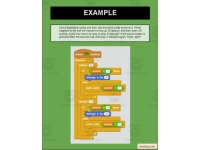
Basketball example code repeats y changes of 20 and -20 ten times each, checking the pause variable to move
Step 5: Apply the controls to a basketball sprite
Attributes
File

PDF

Editable
No
Author
Roombop
Rating
Add To Collection
Add to collection Add to collection

About This Product

This guide will show you how to implement a play and pause button in Scratch. This resource will take your students through setting up an example play & pause moving basketball. It teaches the students the step by step process and logic behind the blocks.

This package is a great resource to have your students follow. These game mechanic guides are great to teach specific techniques and skills that can be used to create a game. They allow the students to expand their knowledge of Scratch. It is recommended that your students have an understanding of Scratch before using this resource.

What's Included

Step by step guide on how to create a pause button in Scratch

0 Reviews

Explore related searches