Teaching Children about Safety and Boundaries - Visual Mind Map (+Template)

- Grades
- Adult Education, Not Grade Specific
- File type
- Multiple File Types
- Editable
- Yes


- Subject
- Special Resources, Life Studies, Social Emotional Learning (SEL), Special Education Needs (SEN), Social Skills, Life Skills, Career, Coaching
- Topic
- safety education, boundaries
- Resource types
- Diagrams, Teacher Tools
- Editable
- Yes
About this resource
What's inside this resource
In today's complex world, teaching children about safety and boundaries is a fundamental aspect of their upbringing. The Teaching Children about Safety and Boundaries - Visual Mind Map (+Template) offers educators an impactful way to build these crucial life skills.
Young learners who understand safety and boundaries are more prepared to guard themselves from potential hazards and make well-informed decisions. This teaching resource helps teachers initiate such important discussions in an age-appropriate manner. It works well in various environments like whole groups, smaller groups or even as homework assignments.
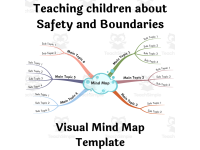
The visual mind map- Allows for free flow of ideas using short phrases, keywords, images, icons
- Adds ease to jotting down ideas quicker for an unhindered flow of concepts
- Aids recall during high-pressure situations like exams or recaps
- Creates a hierarchical structure that visually breaks down subjects showing their interconnectedness
- Takes any vast topic presented initially towards clarity by seeing the 'bigger picture'
This resource accommodates any educational need adapting effortlessly from student use for exam preparation up to CEOs formulating dynamic business strategies with equal efficiency. Particularly instrumental for educators promoting improved communication within classrooms.
Note: For the best view can be achieved by zooming on particular branches while viewing on Desktop/Laptop versions unlike mobile devices.Your Package contains:
- A helpful PDF outlining 'Benefits of Mind Mapping'
- A Template Link Download file (PDF) directing you towards your own personal Visual Mind Map
- 'Classic & Right Aligned variant'of complete Visual Mind Maps accessible through all popular web browsers.
In conclusion, this innovative educational tool is well suited for teaching adults and educators seeking resources catering to broader subjects or special requirements. It's particularly useful for Social Emotional Learning, Special Education Needs (SEN), social skills and life skills instruction.
Related resources
More resources teachers may find useful
24 related resources were found using this product's title, contributor, categories and tags.



In the classroom
Teaching tips & learning objectives

Teaching tips
Open the .htm files on a laptop or desktop rather than a phone - the instructions repeat that a mind map needs the larger screen along with the drag-to-pan and Ctrl or Cmd zoom controls
Collapse every branch except one using the numbered button beside it before projecting the map, so a group sees a single section at a time instead of the whole diagram
Walk through the reading convention on page 4 of the primer before handing the map to anyone new to the format: start at the top right corner, follow the arrows and move clockwise around the circle

Skills covered
Reading a mind map - the primer's clockwise convention, starting from the top right corner and following the arrows, is spelled out for a reader meeting the layout for the first time.
Navigating a branching diagram - the numbered button beside each branch shows how many sub-branches it holds and toggles that branch collapsed or expanded while working through the map.
Structuring a topic hierarchically - the primer explains the central topic, sub-topic and sub-category layering that the supplied map is built on, which is the same structure a teacher would reuse to map another subject.
Good to know
Questions teachers ask about this resource
How is the mind map itself opened and moved around?
The .htm files open directly in a desktop web browser - Chrome, Firefox, Safari, Opera or Edge are all named. Once open, click and drag to pan, and press Ctrl with + or - on Windows, or Cmd with + or - on a Mac, to zoom into a branch.
What do the numbers sitting next to the branches mean?
Each number is a button showing how many sub-branches that branch holds. Clicking it collapses or expands the branch, which lets a reader finish one section, close it and move to the next.
What is involved in changing the branches rather than just reading them?
Editing runs through Mindomo. Open the map, choose the hamburger menu at the top left, select "Copy and Edit" and sign in when prompted. From there Enter adds a branch, Tab adds a sub-branch, Delete removes a branch, and right-click opens shape, colour and font options; Shift plus a mouse drag selects several branches at once.

No reviews yet
Downloaded this resource? Tell other teachers how it went.
Resource details
Concepts & topics
Core concepts
 Core concepts
Mind mapping
Visual organizers
Hierarchical topic structure
Child safety and boundaries
 Topics
Explore more
Categories this resource belongs to
Explore related searches
More to explore
You may also like