search
user.png
vertical menu

Trick or Treat October | Kindergarten Unplugged / Digital Coding

Trick or Treat October | Kindergarten Unplugged / Digital Coding preview
Trick or Treat October | Kindergarten Unplugged / Digital Coding preview 2
Trick or Treat October | Kindergarten Unplugged / Digital Coding preview 3
Trick or Treat October | Kindergarten Unplugged / Digital Coding preview 4

Look Inside · 8 pages

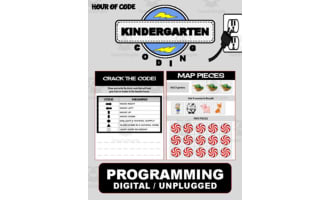
Kindergarten coding cover labeled 'Hour of Code' and 'Programming Digital / Unplugged,' with activity samples
Cover of the Halloween coding resource
Resource overview lists Halloween coding activities, teacher and student directions, and PDF and Google Slides formats
Overview of the coding activities and formats
Teacher directions explain partner map building, recording and checking code, and sharing digital slides
Teacher setup for printable and digital play
Student play directions include a trick-or-treater start piece, a haunted house end piece, and digital steps
Student instructions and start and end pieces
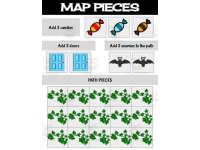
Coding map cutouts include three candies, two doors, two bat enemies, and 15 leafy path pieces to place
Cutout sheet of 22 coding map pieces
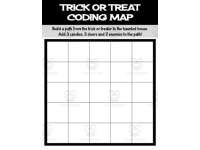
Trick or Treat Coding Map asks students to build a path to the haunted house with candies, doors, and enemies
Coding map for building the trick-or-treat path
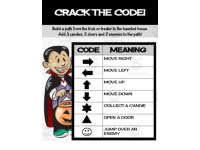
Crack the Code recording sheet gives symbols for four directions, collecting candy, opening doors, and jumping
Recording sheet for the student's code sequence
Crack the Code display chart defines arrows, a star for candy, a triangle for doors, and a smiley for jumping
Code reference chart for smartboard display
Attributes
Grades

Preschool, Kindergarten, Grade 1

Types

Activities

File

PDF

Editable
No
Author
Roombop
Rating
Add To Collection
Add to collection Add to collection

About This Product

Trick or Treat October | Kindergarten Unplugged / Digital Coding

Description: This is a resource designed to introduce Kindergarten students to basic logic puzzles and coding. It doesn't require a computer, making it versatile for different settings.
Main Features:
  • Beach-themed STEM activity modules for any time of the year.
  • Puzzles are fun, educational, and encourage critical thinking.
  • Packed with printable color maps and commands that promote tactile learning abilities.
Educational Rigor:: The activities encompass kindergarten-level computer science concepts, elements of problem-solving in grade 1 as well as pre-kindergarten.
Educator Resources:: Directions on how these resources can be incorporated into lesson plans are included in the package
Learner Instructions:: Detailed instructions on how the games work, suitable for large classrooms, small study groups, take-home projects or homeschooling sessions.

Format

The modules is edited as standard-sized Google Slide (11 x 8.5 inches) and also available as a printable PDF. Additionally there are:
  • Digital drag-and-drop slides suitable for Google Classroom distribution
Ideal especially during distance learning classes where physical interactivity isn't possible. This resource serves not just as logic puzzle printouts but readily adapts into a digital session package perfect for individual needs. Overall Review: Trick or Treat October | Kindergarten Unplugged / Digital Coding serves efficiently to provide elementary stepping stones in preschoolers’ exploration of computer science.

What's Included

Halloween coding activity

0 Reviews

Explore related searches