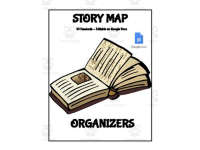
Digital Story Map Templates for Google Docs


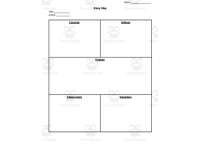
- Grades
- Preschool–Pre-K, Grades 1–12, Elementary, Middle School, High School
- File type
- Google Docs
- Editable
- Yes


- Subject
- ELA, Reading
- Topic
- teaching tool, graphic organizer
- Resource types
- Templates, Teacher Tools
- Editable
- Yes
About this resource
What's inside this resource
Digital Story Maps Templates: A Versatile Teaching Tool
Designed to enhance students' comprehension and summary skills across a compilation of literary texts, the Digital Story Maps Templates is accessible in an editable format on Google Docs. This product complements language arts classes and caters to learners from Kindergarten through Grade 12.
A Graphic Organizer for Various Learning Materials
The tool functions as a graphic organizer capturing key elements from novels, short stories, or any informational material. It supports teachers in simplifying student understanding of plot structures or character developments while leaving space for annotation of poem themes or analyses of complex articles.
Versatility meets Customization:
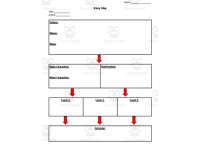
- This resource offers 10 distinct story mapping handouts for educators to choose based on their students' readings and individual learning requirements.
- Being digital enables teachers to customize the handouts where required, whether content- wise or decision-wise between hard copies versus digital engagement on Google Docs.
Potential Implementation Scenarios:
- Whole class discussions: Engages everyone simultaneously while encouraging peer learning via shared insights on subjects like character motivations or story timelines.
- Pair activities/ Small groups : Learners collaboratively work with these maps gaining negotiation and compromise skills – significant assets meeting common standards engaging speaking and listening benchmarks.
- Solo Homework assignments : Linked directly into students' reading schedules; this tool fosters independent application promoting visual representation of annotations off classroom environments directly from home.
Conclusion:
With the Digital Story Maps Templates(Editable on Google Docs),educators will be well-equipped to guide their students' literary journey while ensuring that they are actively involved in charting their unique reading adventures.
Related resources
More resources teachers may find useful
22 related resources were found using this product's title, contributor, categories and tags.


In the classroom
Teaching tips & learning objectives

Learning objectives
- Identify characters, setting, problem and resolution in a story
- Sequence the major events of a plot
- Summarize a story and state its theme

Teaching tips
- Match the map to the text: the four-box drawing map and 5 W's page ask for less than the climax-and-theme map suited to longer works.

Skills covered
- Story element analysis — recording characters, setting, conflict and resolution
- Sequencing — listing major events in order through to the climax
- Summarizing — answering what the story is about, the problem and how it was solved
Good to know
Questions teachers ask about this resource
What is needed to edit the maps?
A Google account lets you make your own copy in Google Docs and edit it; the maps can also be printed from the PDF.

No reviews yet
Downloaded this resource? Tell other teachers how it went.
Resource details
Concepts & topics
Core concepts
 Core concepts
- Story elements
- Plot
- Conflict
- Resolution
- Theme
 Topics
Explore more
Categories this resource belongs to
Explore related searches
More to explore
You may also like