


Photoshop Activity: Winterize An Image
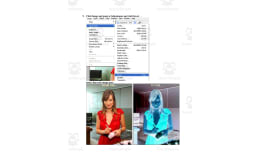
Winter photo-editing activity for Adobe Photoshop: students follow 21 numbered steps to turn an outdoor photo into a snowy-looking scene with Quick Mask, Hue/Saturation and a Channel Mixer adjustment layer.


- Grades
- Grades 7–10, Middle School, High School
- File type
- Microsoft Word


- Subject
- Science, Technology
- Topic
- images, graphics
- Resource types
- Activities
About this resource
What's inside this resource
Students will work with digital tools in the Winterize An Image Photoshop Activity.
Students will take an image and add elements to make it appear set in winter.
Step by step directions are included.
Related resources
More resources teachers may find useful
24 related resources were found using this product's title, contributor, categories and tags.


In the classroom
Teaching tips & learning objectives

Learning objectives
- Create and invert a selection using Quick Mask
- Apply Hue/Saturation and Channel Mixer adjustment layers to change an image's appearance

Teaching tips
- Each student needs Adobe Photoshop and a digital outdoor photo that shows sky to work on.

Skills covered
- Masking — painting a Quick Mask over foliage and inverting the selection
- Adjustment layers — entering set Channel Mixer values to create the winter effect

No reviews yet
Downloaded this resource? Tell other teachers how it went.
Resource details
Concepts & topics
Core concepts
 Core concepts
- Adobe Photoshop
- Quick Mask
- Adjustment layers
- Channel Mixer
- Hue/Saturation
 Topics
Explore more
Categories this resource belongs to
Explore related searches
More to explore
You may also like

Activities


Activities

Projects, Activities

Activities

Activities

Activities