Guided Reading Level B: Simple Machines at Home





ELA, Resources for Teachers, Reading Comprehension, Reading, Science, Language Development, Pre-Reading, Vocabulary, Physics
Kindergarten, Preschool, Grade 1
Worksheets & Printables, Worksheets, Teacher Tools, Centers, Activities, Literacy Readers, Quizzes, Quizzes and Tests, Assessments


About This Product
This Guided Reading Book - Simple Machines at Home (Level B) includes:
Guided Reading Color Label (front cover x1)
This is a quick way to match the book’s demands to what students can generally handle..
The overall goal is to use the level/color to pick books for several smaller groups. To qualify for a certain level, a student is expected to read a book from that level with about 90–94% accuracy.
If a student is consistently accurate and understands, move up a level. If the student is struggling at that level, drop down and add more support.
Each student will improve at completely different rates, but it is generally one of the best ways to check progress across the class.
DOWNLOAD THE CATALOG TO VIEW ALL GUIDED READING BOOKS AVAILABLE (SORTED LEVELS A-Z)
Pre-Reading Question (x1)
Teacher asks the prompt aloud, can be while showing the cover or first page.
Students share what they already know, or make educated guesses from the cover. Prompt them to use the target vocabulary.
Write some of their responses on the board to look back at during the reading.
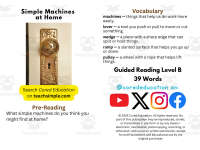
Vocabulary Words (x5)
Introduce the five words, best doing it one at a time. Start by saying it, while students repeat and then see if anyone knows what it means before reading further. Read through the meaning and try to briefly connect each word to a picture or gesture so it’s meaningful.
Ask students to flip through the book pages and point to where they see each of the vocabulary words.
While reading the book pause upon coming across one of the vocab words or read the sentence twice to make sure students understand the word has appeared.
Optional: Ask students to raise hands whenever they see/hear one of the new words.
Guided Reading Pages (x10)
Check the book snapshot (below) for:
primary topic - do you need to prep extra reading or intro materials on this?
what is taught best - decide on 1-2 bullets to focus on, use the prompt or words provided here for best results.
learning goals - what you are checking for students to be able to do after the session, elicit answers using prompts or words provided.
key vocabulary (see section above).
questions overview - so you know what is coming up and if you need to prep extra materials to assist understanding.
Run the lesson
You may have already looked at a few of the pages together, but you can show them some of the pictures again first to set meaning.
Depending on how much time you have and how familiar your students are with guided reading class, you may want to read the book aloud first with the group first.
Students whisper or partner read, while you listen in. If time, do it as a group, one student reading a page each.
Use the guided page’s prompts to coach: “Check the picture / does it make sense?” “Point under the words / try the first sound” “Reread the sentence smoothly”.
Try to focus more on one student per session (rotating every time), so you can work out if they are ready to move up or need to move down a level.
Comprehension Questions (back cover x3)
This is your way to check that students didn’t just say the words, but actually understood the text.
First, let students answer by pointing to the page/picture and saying a short sentence.
After any answer, follow with: “Show me where you found that in the text.”
In bigger groups, have partners answer first (10–20 seconds), then call on 2–3 students to share.
Differentiation tips:
Emerging speakers/struggling readers: oral + pointing
On-level: oral in a full sentence
Higher: one written sentence or draw + label
Book Snapshot
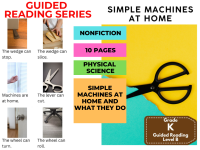
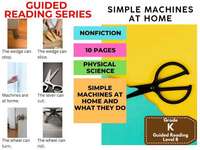
Title: Simple Machines at Home
Genre: Nonfiction
Subject: Science
Primary Topic: Simple machines at home and what they do
Estimated Guided Reading Level (A–Z): B
What This Book Teaches Best
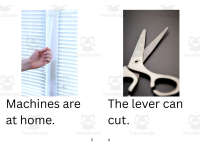
Recognizing that “machines are at home” and used in everyday life.
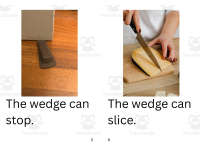
Learning what specific simple machines can do (cut, stop, slice, help, hold, turn, roll, lift).
Building early reading fluency with repeated sentence patterns (“The ___ can ___.”).
Using text-and-picture support to connect tool names to actions (lever, wedge, ramp, screw, wheel, pulley).
Learning Goals
Students will identify the topic of the book as simple machines at home.
Students will name at least three simple machines mentioned in the text.
Students will describe what a lever, wedge, ramp, screw, wheel, or pulley can do using the book’s sentences.
Students will answer who/what questions by pointing to or rereading a matching page.
Students will use the sentence frame “The ___ can ___.” to retell information from the book.
Key Vocabulary From the Text
lever — a tool that helps you cut.
wedge — a tool that can stop or slice.
ramp — a slanted surface that can help.
screw — a piece that can hold things together.
pulley — a tool that can lift.
Discussion Prompts
Pre-reading question: What machines do you think you might find at home?
Comprehension questions:
What can the lever do?
What are two things the wedge can do?
What does the last page say about simple machines?
Printing Tips
1. Best Printing Method (Recommended)
“Booklet” Printing (Best if Available)
If your printer or PDF viewer supports Booklet Printing, use this.
Settings to use:
Print mode: Booklet
Paper size: Letter or A4 (either works)
Orientation: Landscape
Print on both sides: Yes
Flip on: Short edge
Scaling: Fit to printable area
Booklet subset:
First test: Front sides only
Then: Back sides only
This will automatically:
Pair pages correctly
Put the cover on the outside
Align everything for folding
After printing, fold in half and staple along the spine.
2. If “Booklet” Printing Is NOT Available
You can still print this correctly with manual duplex printing.
Step-by-step:
Open the PDF.
Choose Print.
Set:
Orientation: Landscape
Pages per sheet: 1
Print on both sides: Yes
Flip on: Short edge
Print all pages.
Because each PDF page already contains two facing book pages, the result will still fold cleanly into a book.
Thousands of Cored Education products are included with your TeachSimple membership.
Download links and encyclopedia index available here.
Resource Tags
0 Reviews
Check out these other great products