



3,932 products added recently
Page 6 - Addition and Subtraction Lesson Plans
Help your students master addition and subtraction through lesson plans that provide clear explanations and practice opportunities. These activities use games and real-life scenarios to make learning relatable. Implement them to ensure students have a strong mathematical foundation.

 Show filters


2nd Grade Morning Work | 180 Days Review | Math & ELA | 1st Quarter
ELA, Math, Grade 2, Centers, Activities, Lesson Plans, Teacher Tools, Worksheets & Printables
Grade 2 Morning Work | 1st Quarter Student Pages + Full-Year Teacher Resources Make your second grade mornings simple, consistent, and purposeful with 45 days of Grade 2 morning work for Quarter 1 . This resource includes ALL teacher resources for the full 180-day program , while the student practice pages included in this pack are Days 1–45 only . What’s Included ⭐ FULL-YEAR TEACHER RESOURCES You receive the complete teacher toolkit for planning, implementing, differentiating, and assessing the entire 180-day program : Teacher Guide with routine, implementation, and differentiation ideas Full 36-week Pacing Guide Skills Checklist for tracking progress Editable Morning Work Schedule in Word + PDF Complete Answer Key for Days 1–180 Full-year skill sequence and planning support 📚 STUDENT PAGES INCLUDED: 1ST QUARTER The student portion of this product includes Days 1–45 , providing 45 days of ready-to-use Grade 2 morning work . Each day includes a two-page set with 20 consistent sections : Page A — Reading & Language Prefixes & suffixes Grammar Reading comprehension Vocabulary Writing prompts Reading challenges Morning SEL check-ins Fun facts Page B — Math & Think Addition Subtraction Money Telling time Measurement Graphs and data Fractions Math challenges Jokes Brain teasers Growth mindset Would You Rather questions Important: The student practice pages included in this product are Days 1–45 only , but the teacher resources and Answer Key cover the complete 180-day program . How It Works in the Classroom Use this Grade 2 morning work as a daily bell ringer, morning routine, independent practice, homework, or spiral review. The predictable two-page format helps students develop independence while you take attendance, greet students, confer with learners, or pull a small group. The Teacher Guide suggests a 10–15 minute routine : Students begin Page A independently. Students complete the Reading & Language sections. Students move to Page B for Math & Think. Use the final discussion sections for quick community sharing. You can also use the pages for: Morning work Bell ringers Homework Early finishers Sub plans Small-group warm-ups Test-prep spiral review Print the pages two-sided, flipping on the long edge , for one sheet per child per day. You can also print one quarter at a time and staple the pages into a student packet. Standards & Learning Goals This Grade 2 morning work resource provides ongoing spiral practice across important second grade ELA and math skills. Students practice skills including: 📖 ELA Prefixes and suffixes Grammar Reading comprehension Vocabulary Writing Reading fluency and response Sentence-level language skills 🔢 Math Addition and subtraction Place value Money and making change Telling time Measurement Graphs and data Fractions Multi-step word problems Mathematical reasoning Quarter 1 begins with foundational second grade skills and builds through the daily sequence. For example, Day 1 includes prefixes and suffixes, nouns, reading comprehension, vocabulary, addition, subtraction, money, time, graphs, measurement, fractions, and a multi-step math challenge . Why Teachers Love It ✨ You get ALL the teacher resources for the entire year. The Teacher Guide, 36-week pacing guide, Skills Checklist, editable schedule, and complete 180-day Answer Key are included—even though the student pages in this particular product are only Quarter 1. ✨ Students get exactly what they need for the first quarter. Days 1–45 provide a complete first-quarter student set without requiring you to purchase or print the other quarters at the same time. ✨ Save planning time. The daily routine is already organized across reading, language, writing, math, and engaging thinking activities. ✨ Build independence. The same sections appear every day, allowing students to quickly learn the routine and work with less teacher direction. ✨ True spiral review. Skills return throughout the year, while the difficulty increases from quarter to quarter. No content repeats across the 180 days. ✨ Differentiate with ease. The Teacher Guide includes strategies for students who need support, on-level learners, students who need a challenge, English learners, and small-group instruction. ✨ Track student growth. The Skills Checklist lets you mark skills as Introduced, Practiced, or Mastered , making it easier to identify areas for reteaching and intervention. ✨ Everything is ready to go. The resource is designed to be ink-friendly, with clear graphics for coins, clocks, rulers, graphs, and fraction models built directly into the student pages. Looking for Grade 2 morning work for Quarter 1 that saves you planning time while giving you a complete teacher system for the entire year? This pack includes 45 days of student practice (Days 1–45) PLUS ALL of the teacher resources for the full 180-day program , including the pacing guide, skills checklist, editable schedule, Teacher Guide, and complete Answer Key. Start your second graders with a consistent, engaging morning routine that keeps important skills fresh from the very first day! 💛
Author Bright Classroom Ideas Marketplace
Rating
Tags Ela, Math, Morning Work, Back To School
Algebra: Addition & Subtraction - Practice the Skill 3 - MAC Software
Math, Algebra, Common Core, Kindergarten, Preschool, Grade 1, 2, Teacher Tools, Lesson Plans
Algebra: Addition & Subtraction - Practice the Skill 3 - MAC Software MAC Software is an exceptional teaching resource that enhances understanding of Algebra in a simplified, yet effective manner. Covering the key construct of Addition and Subtraction, this digital tool intricately designs practice drills to solidify comprehension and mastery. Ideal for preschoolers to second graders, this software offers content rooted in curriculum standards. Main Features: Enables students to learn by doing through fill-in-the-gap activities based on number lines. Aids students improve their problem-solving speed and efficiency under timed conditions. Multilingual support with both English and Spanish voice over options along with corresponding text for diverse audiences. Versatility for various environments such as whole-group instructions in classrooms or small-group interactions during homeschooling sessions and one-on-one tutoring or independent study. The versatility provided by this software doesn’t end here; it extends itself into adaptability across different environments like whole-group instructions in classrooms or small-group interactions during homeschooling sessions. Even one-on-one tutoring or independent study can gain immensely from engaging with these math-centric exercises as homework assignments. Beyond just adhering to the Common Core State Standards for mathematical tenacity among young learners, our software aligns itself neatly within STEM initiatives as well as NCTM standards – thereby ensuring a comprehensive edtech solution that holistically covers all necessary dimensions of early-stage algebra learning.Please note your download will consist of 1 zip file containing MAC software compatible materials. In essence, Algebra: Addition & Subtraction - Practice the Skill 3 - MAC Software reveals itself not just as a standalone educational tool but forms an integrated piece within any existing pedagogical structure where focus on bolstering math skills reigns supreme.
Author Classroom Complete Press
Tags Algebra Lesson, Math Lesson, Math Skills, Digital Math, Addition Practice

Geometry: Decomposing Geometric Shapes - Learn the Skill - PC Software
Math, Geometry, Common Core, Kindergarten, Preschool, Grade 1, 2, Teacher Tools, Lesson Plans
Geometry: Decomposing Geometric Shapes - Learn the Skill - PC Software Highlight:This practical teaching resource is designed to boost learning in preschool, kindergarten, and first and second grades. It provides a comprehensive cover on geometry, focused on decomposing geometric shapes. This aligns perfectly with Common Core State Standards and STEM initiatives. The learning approach: Curriculum -based content introduces learners to core concepts through real-life word problems enhancing understanding of principles involved in decomposing shapes. The software package also includes useful math tools to further sharpen their skills. Versatility at its Best Easily adapts to any setting or presentation manner. Suitable for large group environments such as traditional classrooms or smaller homeschool settings guided by an educator. Friendly interface design enables use for individual study activities or homework assignments. Inclusivity Focused The resource appeals to both English-speaking students and Spanish-speaking students. Standard features include English voiceover and text. However, for Spanish-speaking students or bilingual contexts there's also an alternate option featuring Spanish voice over and text integrated into this digital learning aid. Installation Made Easy No complicated installations! Just one zip file ensures educators can set up quickly without hassles thereby focusing more on creating engaging lesson plans while students uncover interactive modules dedicated solely for education enrichment within the software package itself. In Summary: Geometry: Decomposing Geometric Shapes - Learn the Skill - PC Software has been crafted keeping "versatility" as its key mantra making it perfect for any classroom scenario; be it groups or lone learners by arming educators with relevant lesson guides while affording an interesting platform making mathematical grasp less daunting. It's math-made-easier with smart use of technology!
Author Classroom Complete Press
Tags Decomposing Activity, Decomposing Shapes, Geometry Lesson, Geometry Activity, Shapes Lesson
Algebra: Equations - Solving with a Variable Input - Practice the Skill 3 - FLASH-MAC
Math, Algebra, Common Core, Grade 3, 4, 5, Teacher Tools, Lesson Plans
FLASH-MAC: Comprehensive Algebra Teaching Resource FLASH-MAC is a comprehensive teaching resource that enhances the understanding of Algebra among Grade 3, Grade 4 and Grade 5 students. It mainly focuses on solving equations with a variable input. This resource conducts timed drill activities to ensure repetitive practice in line with curriculum -based content. The tool prompts students to solve mathematical equations using provided values as variables, boosting procedural fluency and reinforcing learners' abilities to proficiently use variables. Inclusive Math Learning Tools The resource comes bundled with conducive math implements contributing substantially towards creating an interactive learning environment. This makes it an asset for students who thrive on experiential learning methods. Beyond theoretical learning, this product enhances problem-solving skills. Versatility: Includes both English and Spanish voice overs alongside text options making it suitable for multilingual classrooms or homeschool settings. In alignment: The contents comply with Common Core State Standards, STEM initiatives and NCTM guidelines thus maintaining high standards of educational practice. Apt Educational Resource The utility of FLASH-MAC extends from introducing new algebraic concepts during gradewide group sessions up to providing focused instruction in small group settings. Assigning these drills as homework can reinforce school concepts while developing individual problem-solving abilities. Housed within captivating designs that engage children in Algebra lessons - FLASH-MAC also equips them with pertinent mathematical comprehension needed at their respective grade levels. As software compatible across Mac-based platforms, it eases your digital lesson planning process through readily available resources. /<
Author Classroom Complete Press
Tags Software (Mac)

Data Analysis & Probability: Bar Graphs - Practice the Skill 2 - MAC Software
Math, Graphing, Common Core, Kindergarten, Preschool, Grade 1, 2, Teacher Tools, Lesson Plans
Data Analysis & Probability: Bar Graphs - Practice the Skill 2 - MAC Software The Data Analysis & Probability: Bar Graphs - Practice the Skill 2 MAC software product is an educational tool intended mostly for early educational levels including: Pre-schoolers Kindergarteners First and second graders. The center of its curriculum is on graphing, a crucial component in mathematics education. This full-featured resource proposes dynamic activities intended to boost learning. It focuses on the understanding of bar graphs for data analysis and probability. The software engages students in timed drill practice skill activities, prompting learners to answer questions based upon a given bar graph. Educators can utilise this software across diverse teaching settings and platforms, whether it be in traditional school classrooms or homeschooling. Teaching modes could range from: Cross-group instruction:To introduce or review graph concepts, Pint-sized group work: To encourage peer-guided learning and more customized attention to varying student proficiency levels. The software also provides an effective additional study material or as homework tasks assistance. Catering to diverse classrooms and learners, this teaching resource comes with default English voice over and text but also includes Spanish voice-over option with Spanish text—an effective way of supporting multilingual classrooms or students learning Spanish without needing any translation work by teachers. This incorporates math tools within the program allowing students to manipulate mathematical objects adding that hands-on aspect often missing from digital resources. In terms of quality assurance, education experts can trust in the material provided aligns with Common Core State Standards—ensuring content relevance—and STEM initiatives while sticking to National Council of Teachers of Mathematics (NCTM) principles. All packed within one handy zip file that is compatible with Mac systems, this tool smoothly incorporates into daily lesson planning for teachers. In summary, the "Data Analysis & Probability: Bar Graphs - Practice the Skill 2" MAC software spurs students' understanding of bar graphs and their practical use in data analysis and probability.
Author Classroom Complete Press
Tags Math Lesson Plan, Data, Probability, Bar Graphs, Digital Math

Grade 3 Math Volume 5
Math, Geometry, Grade 3, Teacher Tools, Lesson Plans
Grade 3 Math Volume 5: An Indispensable New Teaching Toolkit The Grade 3 Math Volume 5 workbook is a bountiful teaching resource created explicitly for the curriculum needs of third graders. This guide mentors learners through complex geometry concepts, ensuring a robust understanding of skills like congruency, similarity, and symmetry. The Dimensions of Learning 41 Interactive Activities: The workbook spans 41 pages housing engaging exercises like math writing tasks that enhance critical thinking; fill-in-the-blank tests which cement conceptual understandings, and well-crafted multiple-choice queries stimulating analytical inferences. Versatile Usage: This source material has varied operational possibilities. It can be integrated into group problem-solving situations or repurposed as small peer-learning exchanges while simultaneously serving to assess learner progress subtly when structured as casual ‘exit tickets.’ Pedagogically Adaptable: This compendium aligns productively with your existing math curriculum . Educators can leverage it as the main instructional guide or use it supplementarily in concert with other lessons. Easily Accessible Resource No more tiresome DIY lesson creation or tediously scouring online repositories- this workbook offers everything prepackaged within an easily accessible downloadable PDF! Enjoy easy printing upon demand! The Revolutionary Approach to Education Grade 3 Math Volume 5 not only offers functionalities that empower student learning but also individualizes instruction catered towards classroom dynamics and unique learning paces. Get your hands on this "Innovative Teaching Toolkit", seeing your student's proficiency levels rise will assuredly follow!
Author Classroom Complete Press
Tags Line Symmetry, Congruency, Math Worksheet, Geometry Worksheet, Math Workbook
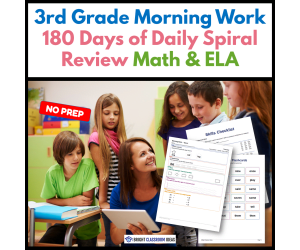
3rd Grade Morning Work | 180 Days of Daily Spiral Review | Math & ELA
ELA, Math, Grade 3, Assessments, Teacher Tools, Lesson Plans, Worksheets & Printables
Grade 3 Morning Work | 180 Days of Common Core Spiral Review | Math & ELA Bell Ringers | Print & Go Start every school day with meaningful, standards-based practice using this Grade 3 Morning Work resource! With 180 days of Common Core spiral review , students strengthen essential math and ELA skills through engaging daily activities that reinforce previously taught concepts all year long. Designed as a simple, no-prep routine, this resource builds independence, improves retention, and helps students enter the classroom focused and ready to learn. What's Included 180 days of printable morning work Two-page daily format (360 student pages) Daily Reading & Language practice: Editing and conventions Prefixes and word study Context clues Reading comprehension passages with text-dependent questions Academic vocabulary Targeted writing skills Writing prompts Reading challenges SEL morning check-ins Fun facts Daily Math & Thinking practice: Multiplication Division Fractions Elapsed time Area Perimeter Word problems Math challenges Brain teasers Jokes Growth mindset quotes Would You Rather prompts Teacher Guide 36-week Pacing Guide Skills Checklist Editable Morning Work Schedule (Word & PDF) Complete Answer Key for every day of the school year How It Works in the Classroom This Grade 3 Morning Work resource is designed for a 15-minute daily routine while remaining flexible enough for multiple classroom settings. Use it for: Morning work Bell ringers Daily spiral review Independent practice Homework Early finisher activities Math warm-ups Reading review RTI and intervention Test preparation Substitute plans The predictable format encourages student independence while giving teachers valuable time to greet students, check homework, conference with individuals, or pull small groups. Standards & Learning Goals This comprehensive spiral review reinforces essential Grade 3 Common Core skills, including: Reading & Language Arts Editing and grammar Prefixes and word study Context clues Reading comprehension Vocabulary development Writing skills Sentence structure Opinion, narrative, and informative writing Math Multiplication and division facts Fractions Elapsed time Area and perimeter Word problems Mathematical reasoning Problem solving Students also build: Reading stamina Critical thinking Growth mindset Social-emotional learning Independent work habits Long-term retention through daily spiral review Why Teachers Love It ❤️ Zero prep—just print and teach ❤️ Covers all 180 instructional days ❤️ Spiral review helps students retain skills all year ❤️ Includes both math and ELA in one daily routine ❤️ Difficulty gradually increases as students grow ❤️ Supports classroom management with a consistent routine ❤️ Includes pacing guides, assessment checklists, editable schedules, and a complete answer key ❤️ Perfect for classrooms, homeschool, intervention groups, and substitute teachers Perfect For Grade 3 Classrooms Morning Work Bell Ringers Daily Spiral Review Common Core Review Math Review Reading Review Independent Practice Early Finishers Homework RTI & MTSS Test Prep If you're looking for a Grade 3 Morning Work resource that combines engaging literacy activities with meaningful math practice, this complete 180-day Common Core spiral review provides everything you need to establish an effective morning routine while strengthening essential third grade skills every day. Download today and make mornings productive, organized, and stress-free all year long!
Author Bright Classroom Ideas Marketplace
Rating
Tags Ela, Math, Daily, Spiral, Review, Yearlong, Full Year, Morning Work
Algebra: Simple Patterns - PC Software
Math, Patterns, Kindergarten, Preschool, Grade 1, 2, Teacher Tools, Lesson Plans
Algebra: Simple Patterns - PC Software A robust teaching software designed to help educators in traditional classrooms and homeschool settings effectively instruct students on the basic concepts of algebra. The content is aligned with the curriculum and ideally suited for preschool, kindergarten, and early grade school level (grades 1-2). Features: Pre-assessment stage: Precisely gauge students' existing knowledge about algebraic patterns before starting a lesson. Detailed Lesson Plan: A comprehensive roadmap that guides teachers through their lessons in an organized manner and ensures key learning objectives are met. Real-world Word Problems: Present algebraic pattern concepts in relatable contexts for a practical understanding of the material. A timed drill activity : Test speed without sacrificing accuracy, ideal for both group lessons or individual study sessions. Additions: The software also includes math tools and printables making it easy to mix digital learning with hands-on activities. Additionally, to make learning more engaging there are multiple built-in games like memory match game, board game ,and spinner games available within the program. Bilingual Support: An added advantage is it's support Spanish voiceover & texts enabling bilingual instruction or assisting second language learners to easily make connections between verbal expressions in two languages. Note: This product is compatible with PCs only . In conclusion, combining all these features makes "Algebra: Simple Patterns - PC Software", an invaluable addition to any modern educational toolkit!
Author Classroom Complete Press
Tags Digital Math, Simple Patterns, Patterns Lesson, Algebra Worksheet, Math Lesson

I WONDER - What Is A Convex Octagon | Animated Video Lesson
STEM, Geometry, Math, Grade 3, 4, 5, 6, 7, 8, 9, Lesson Plans, Teacher Tools
Video Introduction An amazing video designed for the students to learn more about STEM. I WONDER - What Is A Convex Octagon | Animated Video Lesson Do you like STEM subjects? what is your favorite one? Have you ever tried to plant a seed? If yes, tell us more about it. Or have you ever tried to invent something? If yes, tell us more about it. And how do you think it will help us? Have you ever seen a microorganism under a microscope? What was it? And how it looked like? Mathematics is a marvelous subject. Let' sharpen our brains and solve some equations. Do you like timetable tricks? What is your favorite one? Do you know how to code? Have you ever created an app or a game before? If yes, how was it like? I WONDER - What Is A Convex Octagon | Animated Video Lesson The video is perfect for encouraging the researching skills for the students, while learning more about this fantastic topic. I WONDER - What Is A Convex Octagon | Animated Video Lesson This friendly designed video is suitable for students at school, homeschooling, and as a group activity. Format Available in MP4 format.
Author Educational Voice
Tags What Is A Convex Octagon, What Is A Convex Octagon Video, Convex Octagon, Convex Octagon Video, Convex Octagon Video For Kids, Convex Octagon Facts, Convex Octagon Facts For Kids, Octagon

Algebra: Proportions - Learn the Skill - FLASH-PC
Math, Algebra, Common Core, Grade 6, 7, 8, Teacher Tools, Lesson Plans
Algebra: Proportions - Learn the Skill - FLASH-PC FLASH-PC is a comprehensive teaching resource aimed at grades 6-8, equipped to help educators in effectively imparting the theoretical and application aspects of Algebraic proportions. The curriculum -based content simplifies complex concepts for students. Main Features: Engagement through Relevance: Real-world word problems allow students to see how mathematical theories apply to everyday scenarios. Teacher-Friendly Tools: The program includes tools for supplementing instruction during both group and individual sessions. Multilingual Accessibility: A default English voice over with text, coupled with an option for Spanish voice-over makes it adaptable even in bilingual classrooms or during language-assisted teaching sessions. Alignments & Perks: The content adheres to the Common Core State Standards, major STEM initiatives, and NCTM guidelines thus ensuring maximum coverage of curriculum objectives. The software file type boasts versatility across various PC systems making this tool both classroom-friendly and remote learning-adaptable. In summary, 'Algebra: Proportions - Learn the Skill' - FLASH-PC, whether used as a class activity or individual practice material can greatly simplify Equation Balancing or Ratio Simplifying whilst keeping learners engaged via real-world word problems. </blockquote
Author Classroom Complete Press
Tags Software (PC), Proportions, Word Problems

Number & Operations: Addition & Subtraction - Practice the Skill 2 - PC Software
Math, Numbers, Common Core, Kindergarten, Preschool, Grade 1, 2, Teacher Tools, Lesson Plans
Number & Operations: Addition & Subtraction - Practice the Skill 2 - PC Software The Number & Operations: Addition & Subtraction software is an enriching resource designed to enhance foundational numerical skills. This tool focuses on solidifying students' grasp on basic addition and subtraction operations. Interactive Learning Experience: Tailored for Pre-school, Kindergarten, Grade 1 and Grade 2 levels, the software offers timed drill activities, stimulating mastery of these fundamental skills in an engaging environment. Specially Designed Math Tools: The package includes comprehensive math tools that aid tactile learners during problem-solving sessions. The product's unique feature is its dual-language capability – offering both English and Spanish voice-over and text instructions for bilingual instruction. Digital Lesson Plan: This fully downloadable zip file, compatible with PC systems. The content offered in this software meets Common Core State Standards (CCSS) and STEM initiatives across different regions relevant to science, technology, engineering, mathematics integrations into teaching programs along with Person Orientation towards auditory learners who gain a better comprehension when they hear instructions spoken out along with practical work session. Versatility And Flexibility : The program caters largely to auditory learners pairing spoken instructions with practical work sessions. Note: Please remember that this resource can be implemented ideally into whole group instruction sessions or smaller focus groups where individual support is necessary or as constructive reinforcement during homework assignments ensuring consistent practice even outside classroom grounds. In Conclusion, This interactive tool increases proficiency in basic math operations, leveraging technology-guided curriculums for an accessible and engaging learning experience. Invest in Number & Operations: Addition & Subtraction - Practice the Skill 2 today!
Author Classroom Complete Press
Tags Math Skills, Digital Math, Operations, Addition, Subtraction
Algebra: Equations - Solving for a Variable - Practice the Skill 3 - FLASH-MAC
Math, Algebra, Common Core, Grade 3, 4, 5, Teacher Tools, Lesson Plans
Algebra: Equations - Solving for a Variable – Practice the Skill 3 (Flash-Mac) Algebra can often be intimidating due to its abstract nature . This resource is designed specifically to help educators unravel the mysteries of algebra for students at Grade 3 to Grade 5. The focus is on equations and teaching students how to solve for variable 'x'. This resource strengthens student understanding through: Timed drill activities: These drills are both engaging and challenging, helping students master tackles equations proficiently. Flexibility:The material can be adapted to whole group instruction, small breakout groups based on varying learning capabilities, or even as homework assignments. Inclusive Teaching Aids & Global Accessibility The resource includes math tools that are straightforward but instructive. Breaking language barriers with voice-over options available not just in English but also Spanish making this resource globally accessible. National Standards Alignment & Compatibility This teaching aid aligns seamlessly with Common Core State Standards (CCSS) . It conforms with STEM initiatives and complements NCTM standards thus ensuring your lessons meet acceptable national benchmarks. The file type format is Software (Mac), guaranteeing ease-of-use from a technological standpoint. Finally yet importantly, 'Algebra: Equations - Solving for a Variable – Practice the Skill 3' can do much more than just simplifying algebraic concepts; it also leads young minds into becoming future problem-solvers!
Author Classroom Complete Press
Tags Software (Mac)

Measurement: Volume & Surface Area - Practice the Skill 1 - FLASH-MAC
Math, Measurements, Common Core, Grade 3, 4, 5, Teacher Tools, Lesson Plans
Measurement: Volume & Surface Area - Practice the Skill 1 - FLASH-MAC For educators in search of practical and engaging teaching resources for elementary math lessons, this resource serves as a comprehensive software option. Designed specifically for Grade 3 to Grade 5 students, it revolves around enhancing understanding of measurement concepts through active learning. This mini pack offers curriculum -based content delivered via adequately timed drill activities. The tasks focus on calculating the volume of various shapes, thereby aiding in development of spatial awareness and strengthening mathematical principles. Active learning approach: Centered on active learning techniques Additional tools: Additional tools cater to different learning styles and bring a hands-on dimension to abstract concepts Inclusive by design, this teaching resource extends support to classrooms with diverse cultures and homeschooling setups alike. It offers English and Spanish voice over plus text options thus overcoming language barriers that can potentially impede comprehension or interest. Built as per Latest Guidelines & Standards The resource aligns with Common Core State Standards and STEM initiatives while also adhering closely with NCTM guidelines. This ensures that your students receive high-quality education that meets current educational benchmarks. Fits into varying teaching scenarios: Suits whole group discussions for introducing new topics or refining existing ones alike and is equally effective for homework assignments aimed at reinforcing the day's learnings. A Comprehensive Solution In conclusion,the "Measurement: Volume & Surface Area - Practice the Skill 1 – FLASH MAC" serves as an invaluable tool in any math class aiming to shape well-rounded learners adept at measurements. This Mac compatible software presents an optimum solution striking a balance between theoretical knowledge, hands-on exercise and inclusivity irrespective of language preferences.
Author Classroom Complete Press
Tags Software (Mac)

I WONDER - How Do You Use Roman Numerals | Animated Video Lesson
History: Ancient, History, Social Studies, History: Europe, Numbers, Early Math, Math, Grade 4, 5, 6, 7, 8, 9, 10, Lesson Plans, Teacher Tools
Video Introduction An amazing video designed for the students to learn more about history. I WONDER - How Do You Use Roman Numerals | Animated Video Lesson Do you like history? Which topic do you really enjoy about history? Have you ever read an interesting fact about the Vikings? If yes, can you mention them? What do you like most about the Victorian era? Can you name all the Tudors? Have you ever wondered how people used to live in ancient Japan and ancient China? Do you know any interesting facts about ancient Egyptians and the Pharaohs? Have you ever visited South America? What do you know about Incas and Aztecs? Celtic culture was really one of a kind, can you name any of the places that Celts used to live in? Imagine yourself living during the ancient Roman empire, how your life will look like? Ancient Greece was an amazing place to live in. What do you know about ancient Greek life? I WONDER - How Do You Use Roman Numerals | Animated Video Lesson The video is perfect for encouraging the researching skills for the students, while learning more about history. I WONDER - How Do You Use Roman Numerals | Animated Video Lesson This friendly designed video is suitable for students at school, homeschooling, and as a group activity. Format Available in MP4 format.
Author Educational Voice
Tags How Do You Use Roman Numerals, How Do You Use Roman Numerals Video, Roman Numerals, Roman Numerals Facts, Roman Numerals Video, Roman Numerals Video For Kids, Roman Numerals Facts For Kids

Number & Operations: Addition & Subtraction - Practice the Skill 2 - FLASH-MAC
Math, Addition and Subtraction, Addition, Common Core, Grade 1, 2, Teacher Tools, Lesson Plans
The Number & Operations: Addition & Subtraction - Practice the Skill 2 - FLASH-MAC: A Comprehensive Teaching Resource This resource aims to develop an understanding of basic arithmetic focusing on addition and subtraction in students. It is primarily suitable for Grade 1 and Grade 2 pupils, perfectly in line with Common Core State Standards. Moreover, it embodies principles spearheaded by STEM initiatives and The National Council of Teachers of Mathematics (NCTM). Key Features: Curriculum -based content: Its critical feature provides timed drill activities that challenge the students' proficiency in fast and accurate subtraction. Inclusive Language Support: The software is built with English voice overs and text, with added options for Spanish voice over along with corresponding Spanish text. Versatile Application:This tool excels whether utilized for whole group instruction or small group workshops, also effective when incorporated into homeschooling programs. The Number & Operations: Addition & Subtraction - Practice the Skill 2 - FLASH-MAC, fostering a positive attitude towards math while developing numerical skills. An ideal companion on your student's journey in understanding mathematics; enriching their knowledge through practical skills exploration while encouraging a fun learning environment.
Author Classroom Complete Press
Tags Software (Mac)

Measurement: Measuring Length - FLASH-PC
Math, Measurements, Grade 1, 2, Teacher Tools, Lesson Plans
Measurement: Measuring Length - FLASH-PC The Measurement: Measuring Length - FLASH-PC is an engaging, educational resource that offers comprehensive insight into the concept of measuring length in Measurement. This tool is specially constructed for educators who are looking to instill a robust understanding of measurements in their students, particularly those studying in grades 1 and 2. A resourceful teaching tool This teaching software primarily targets Mathematics instruction but also serves as a dynamic asset for various measurement-related lesson plans. Pre- assessment materials: These elements are essential for establishing a base-level understanding before proceeding to complex topics. Educative lesson plans: Each plan is carefully designed with an intent to fulfill curriculum-based needs while emphasizing student comprehension. Real-world word problems: This aids enlightening students with practical problem-solving techniques intrinsic to measurements. Timed drill activities: Regular engagement with these drills improvises speed and accuracy among learners. Diverse instructional methods The software accommodates both group work and focus group activities catering to diverse pedagogical needs. It also includes printable worksheets making it adaptable for various instructional environments such as classrooms or homeschooling setups. Fostering active participation and critical thinking skills Learners can engage in memory match games, interactive board games, and spinner games promoting active participation while learning Math topics such as Measurements. Bilingual focus & Technological alignment Inclusive of Spanish voice over text options alongside standard English thus enabling language versatility for ESL learners' learning needs. Corresponding with rapid technology advancements, the product includes SMART Response assessments which offer teachers a progressive way to track student progress. To conclude, Measurement: Measuring Length - FLASH-PC proves to be an invaluable addition to all educators striving for a dynamic instructional approach blended nicely with retention of pedagogical fundamentals.
Author Classroom Complete Press
Tags Pre-assessment, Money Activity, Measuring, Length, Measurement

Number & Operations: Base-Ten & Place Value for 3rd-5th - Practice the Skill 3 - MAC Software
Math, Place Value, Common Core, Grade 3, 4, 5, Teacher Tools, Lesson Plans
Number & Operations: Base-Ten & Place Value for 3rd-5th - Practice the Skill 3 - MAC Software This cutting-edge educational tool is designed as guided practice for students in the 3rd, 4th, and 5th grades . Nested within an easy-to-use MAC software interface, it focuses on strengthening understanding of Base-Ten and Place Value concepts in Number and Operations. The objective of this software is to fortify foundational math skills through engaging timed drills . It challenges students to add or subtract base-ten blocks, thus boosting their confidence when manipulating numbers. The package contains a user-friendly software specifically tailored for MAC users. Apart from skill drill activities, the resource also offers handy Math tools integrated into its curriculum -based content. Its aim is not just to assist problem-solving but also to encourage autonomous learning among students. In order to meet the needs of a diverse student body, English voice over and text have been included alongside Spanish language options demonstrating its inclusive approach. It adheres strictly to Common Core State Standards, STEM initiatives, and NCTM recommendations—reflecting its wide academic applicability which can benefit both public school classrooms or homeschooling modules alike. Uses: • Employed as a whole group instruction setting—ideal for fostering collective comprehension during collaborative sessions in classrooms • As homework assignments enhancing confident solo problem solving abilities of learners. All benefits considered, choosing Number & Operations: Base-Ten & Place Value teaching resource affords faculty access to quality lesson plans equipped with effective tactics focusing primarily on subtraction and addition tasks concerning place values—a perfect aid ensuring smooth navigation through intricate math lessons!
Author Classroom Complete Press
Tags Digital Math, Base-ten Blocks, Place Value Lesson, Math Lesson, Math Skills

Displaying Data and Probability
Math, Statistics, Grade 5, Teacher Tools, Lesson Plans
Displaying Data and Probability This resource is primarily meant for Grade 5 students studying Statistics as part of their Math curriculum. It contains various activities and lessons, simplified to aid understanding of complex mathematic concepts. Focus areas include: Displaying Data Circle Graphs Bar Graphs Probability About each section: The Displaying Data Section: In this activity -rich section, students are guided on how to efficiently collect, systematically organize, skillfully analyze, and neatly display data. The Circle Graphs Section: A hands-on approach is employed in teaching students how to accurately draw out pie charts using the provided data as well as elucidating the degrees represented by each slice. The Bar Graph Section: The bar graph toolkit encourages logical collection and organization of data into easy-to-understand graphs that include both single bar graphs as well double bar graphs. The Probability Section : This section simplifies probability with relevant vocabulary and varied ways of expression thereby laying a solid foundation into understanding this fundamental mathematics model. The resource also includes an exclusive guide on teaching complicated topics like computing sample space through tree diagrams. Finally delivered in a convenient PDF format suitable for both print outs or digital viewing- The Displaying Data and Probability guide is an all-encompassing methodology that aids educators whether they operate within traditional classroom settings or homeschool their pupils.
Author Classroom Complete Press
Tags PDF

Measurement: Measuring Length - Practice the Skill 3 - MAC Software
Math, Measurements, Common Core, Kindergarten, Preschool, Grade 1, 2, Teacher Tools, Lesson Plans
Measurement: Measuring Length - Practice the Skill 3 - MAC Software This dynamic teaching tool, designed to enhance understanding of measurement concepts in preschool through grade 2 students, features a captivating mini chapter focusing on length measurement skills. The software is meticulously crafted to marry curriculum-based content with timed drill activities for practice. Main Features: Created bearing in mind students' unique learning styles and abilities. Incorporates interactive drills that allow learners to convert given measurements using provided formulas. Inclusive mathematical tools are integrated into the software aiding further learning process. The program offers versatility with English and Spanish voice over and text options. Alignment with recognized educational practices: The key content areas of the software aligns remarkably well with Common Core State Standards and STEM initiatives. Its design adheres strictly to guidelines outlined by the National Council of Teachers of Mathematics (NCTM). Versatile utility across various classroom contexts: This resource can be utilized for individual study or group collaboration within classrooms, Critically beneficial as a value-added homework assignment activity , . Note:The software is downloadable as a zip file compatible only for MAC systems. In conclusion, Measurement: Measuring Length - Practice the Skill 3 - MAC Software holds astonishing potential as a state-of-the-art teaching resource leading your students towards better proficiency in mathematics. This practical tool fortifies active involvement among young learners while strengthening essential mathematical concepts related to Measurements.
Author Classroom Complete Press
Tags Math Lesson Plan, Measurement Lesson, Length, Digital Math, Math Skills

I WONDER - Does A Cuboid Have Right Angles | Animated Video Lesson
STEM, Geometry, Math, Grade 3, 4, 5, 6, 7, 8, 9, Lesson Plans, Teacher Tools
Video Introduction An amazing video designed for the students to learn more about STEM. I WONDER - Does A Cuboid Have Right Angles | Animated Video Lesson Do you like STEM subjects? what is your favorite one? Have you ever tried to plant a seed? If yes, tell us more about it. Or have you ever tried to invent something? If yes, tell us more about it. And how do you think it will help us? Have you ever seen a microorganism under a microscope? What was it? And how it looked like? Mathematics is a marvelous subject. Let' sharpen our brains and solve some equations. Do you like timetable tricks? What is your favorite one? Do you know how to code? Have you ever created an app or a game before? If yes, how was it like? I WONDER - Does A Cuboid Have Right Angles | Animated Video Lesson The video is perfect for encouraging the researching skills for the students, while learning more about this fantastic topic. I WONDER - Does A Cuboid Have Right Angles | Animated Video Lesson This friendly designed video is suitable for students at school, homeschooling, and as a group activity. Format Available in MP4 format.
Author Educational Voice
Tags Does A Cuboid Have Right Angles, Does A Cuboid Have Right Angles Video, Cuboid Angles, Cuboid Angles Facts, Cuboid Angles Facts For Kids, Cuboid Angles Video, Cuboid Angles Video For Kids, Cuboid

Number & Operations: Counting & Ordering Objects - Practice the Skill 3 - PC Software
Math, Numbers, Common Core, Kindergarten, Preschool, Grade 1, 2, Teacher Tools, Lesson Plans
Introducing Number & Operations: Counting & Ordering Objects An excellent teaching resource for early childhood education. This interactive software assists students in understanding the basics of counting and ordering objects. Key Features: Timed drills for practice Differentiating between odd or even numbers Incorporation of math tools for practical application The exercises can be integrated into study sessions or as homework assignments, allowing children to reinforce learning at their own pace. Inclusivity and Standards Alignment: The software caters to both English and Spanish speakers. It aligns with Common Core State Standards (CCSS), meets STEM initiatives and conforms to the National Council of Teachers Mathematics (NCTM) guidelines. User-friendly Software Format: Included is a zip file compatible with Windows OS. It can be installed on school computers or personal laptops, making it accessible wherever learning happens. Versatility in Learning Scenarios: The tool proves beneficial for whole group instruction in classrooms, small study groups, or individual learning environments at home. A valuable addition to your educational resources indeed! Suggestion:Incorporate Number & Operations: Counting & Ordering Objects into your lesson plans today! Enhance teaching prowess while catering effectively to varied learning styles!
Author Classroom Complete Press
Tags Numbers, Operations, Ordering Objects, Digital Math, Math Skills
Number & Operations: Grouping Objects & Number Lines - FLASH-PC
Math, Numbers, Grade 1, 2, Teacher Tools, Lesson Plans
<h3>Overview</h3> <p>The <b>Number & Operations: Grouping Objects & Number Lines - FLASH-PC</b>, designed for grade 1 and grade 2 math educators, is a comprehensive resource that simplifies the teaching of grouping objects and number lines within the context of number operation.</p> <h4>Key Features:</h4> Pre-assessment area Detailed lesson plan station with real-world application problems, Timed drill exercises for practice, Dedicated math tools with printables to illustrate concepts, <p style="font-style: italic;">& As a bonus, it also includes interactive games such as memory matching game, a themed board game, and spinner game.</*p*> Bilingual Support: The product supports multicultural or diverse classes by providing supplementary Spanish voice-over option alongside Spanish text. Student Progress Tracking: Incorporates SMART Response Assessment tool that provides real-time statistics on learner progression data through interactive quizzes. It also allows for student’s independent study at home in the form of homework assignments. Software Compatibility: User-friendly Software (PC) file type ensures flawless functioning on any standard PC.</p> & Note: The Number & Operations module is designed to make curriculum learning engaging and easy-to-grasp through its gamified interface and real-time assessment tool.
Author Classroom Complete Press
Tags Software (PC), Spanish, Math Lesson Plans, Numbers And Operations, Grouping
Number & Operations: Percentages with Fractions - Practice the Skill 1 - FLASH-MAC
Math, Percentages, Common Core, Grade 3, 4, 5, Teacher Tools, Lesson Plans
Number & Operations: Percentages with Fractions - Practice the Skill 1 - FLASH-MAC This education tool aligns perfectly with Grade 3-5 curricula, focusing on number operations and relationships between percentages and fractions. It boasts features such as: Timed drill activities: These challenges push students to identify percentage equivalents of given fractions, reinforcing their understanding of percentage-to-fraction relationships. Dual language support (English and Spanish): With voice-over narrations and text available in both languages, this resource encourages inclusivity in education settings. Interactive math tools: Students can dynamically interact during problem-solving processes using these hands-on tools—boosting engagement levels and simplifying complex fraction concepts. Number & Operations: Percentages with Fractions proudly aligns itself with Common Core State Standards, NCTM standards, as well as STEM initiatives. Its flexible design facilitates various implementation scenarios: In whole group instruction settings, In small breakout sessions emphasizing collaborative learning, As additional homework assignments that allow skills consolidation outside classroom parameters. Digital Teaching Platform Compatibility for Mac Users The software is designed exclusively for Mac users—it easily integrates into digital teaching platforms or virtual classrooms without hassle. Employing accessible language while maintaining factual presentation—this resource goes beyond typical lessons by optimizing student engagement while successfully achieving mandatory curriculum benchmarks.
Author Classroom Complete Press
Tags Software (Mac)
Number & Operations: Fractions - Addition & Subtraction - Learn the Skill - FLASH-MAC
Math, Fractions, Common Core, Grade 3, 4, 5, Teacher Tools, Lesson Plans
FLASH-MAC: Number & Operations: Fractions - Addition & Subtraction - Learn the Skill This teaching resource delivers comprehensive education on adding and subtracting fractions. Primarily designed for grades 3-5, it explores key mathematical concepts in number operations. Curriculum-based Learning This curriculum-based chapter mini program offers real-world problem-solving experiences to help students understand the arithmetic of fractions. Emphasis is more on understanding addition and subtraction techniques within relatable scenarios, furthermore enhancing their problem-solving ability using different math tools provided in this resource. Dual Language Capability The product features English voice-over and text as default along with a Spanish option, ensuring diverse learners' needs are met. Focused Lesson Plans This educational tool meets Common Core State Standards echoing nationally recognized norms for Focused Lesson Plans across all states. It can be used effectively across whole group discussions or even smaller subgroup brainstorm sessions due to its comprehensive design. Digital Format Accessibility A standout feature of this product is its accessibility through Mac software, which enables seamless integration into digital classrooms or homeschooling setups. Furthermore, it also provides homework assignment opportunities to users free from physical limitations! In Conclusion... Tutors seeking reliable teaching resources will undoubtedly find FLASH-MAC helpful. This resource not only offers students insights into fractal arithmetic but also enhances their critical thinking skills applicable in overlooked everyday situations!
Author Classroom Complete Press
Tags Software (Mac)