Alphabet Banner Letters for the Classroom Bulletin Board



- Grades
- Pre-K–3
- Pages
- 52
- File type
- Microsoft PowerPoint
- Editable
- Yes


- Topic
- Alphabet banner, Bulletin board
- Resource types
- Teacher Tools, Bulletin Boards, Templates
- Editable
- Yes
Product description
From the author
Editable Alphabet Banners | Bulletin Board Banner Letters
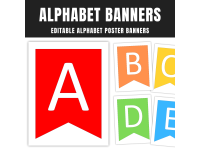
Brighten up your classroom with these Editable Alphabet Banners. These colorful, customizable letters are perfect for bulletin boards and classroom displays.
What’s Included:
Full set of letters (A-Z)
Editable PowerPoint format
26 pages for capital letters (A-Z)
26 pages for small letters (a-z)
Banner Size: 7" x 9.5"
The banners are simple to print and put together. You can adjust the colors and style to match your classroom theme. Use them for a welcome display, seasonal decorations, or classroom events.
These editable letters are perfect for any classroom. They are easy to use and great for any grade level. Customize the letters to fit your needs. Print them in any size you need.
You’ll love how quickly these banners come together. They add a special touch to your classroom, making it feel welcoming and fun. Whether you're starting the school year or celebrating an event, these banners are a perfect fit.
Related resources
More resources teachers may find useful
24 related resources were found using this product's title, contributor, categories and tags.

In the classroom
Teaching tips & learning objectives

Teaching tips
Print the uppercase set for a formal bulletin-board banner, or use the lowercase set for a softer look, since the file provides a complete run of each case.
Edit the text boxes in PowerPoint to change the font, color, or size of each letter before printing, since the letters are native editable text rather than flattened images.
Cut apart and string the printed letters in sequence to spell out classroom titles or headings using the individual A-Z and a-z slides as building blocks.

No reviews yet
Downloaded this resource? Tell other teachers how it went.
Resource details
Concepts & topics
Core concepts
 Core concepts
Alphabet letters
Classroom decor
 Topics
More to explore
You may also like