



Let Me Introduce My Selfie | Back to School Activity
- Grades
- Grades 1–5
- Pages
- 2
- File type
- Microsoft PowerPoint
- Editable
- Yes


- Subject
- Back To School
- Topic
- Selfie introduction, All about me
- Resource types
- Activities, Templates
- Editable
- Yes
Product description
From the author
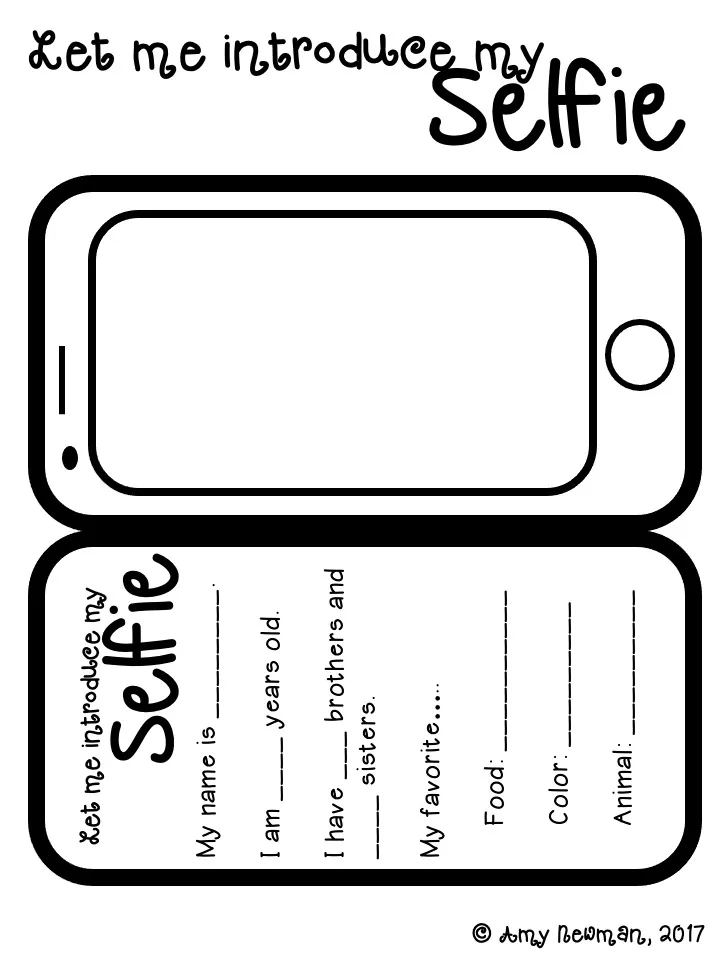
This resource is a back to school activity called 'Let Me Introduce My Selfie.'
Students will use the cellphone template to write about themselves and fill in the blank. Then they can draw a selfie of themselves.
Related resources
More resources teachers may find useful
24 related resources were found using this product's title, contributor, categories and tags.


In the classroom
Teaching tips & learning objectives

Learning objectives
Complete a sentence frame so the finished line reads as a whole sentence, not just a filled gap
Supply factual personal information — name, age and the number of brothers and sisters
Choose and name a favourite in three set categories: food, colour and animal

Teaching tips
Read the frames aloud before students fill them in.
Invite students to share one favorite with a partner.
Print the first slide for the activity; the second slide is blank. Allow students to adapt or skip a personal-information prompt.

Skills covered
Writing personal information — seven response blanks cover name, age, brothers, sisters, favorite food, color and animal.
Sentence completion — the name, age and sibling frames provide sentence structure; favorite items use labeled fields.
Self-portrait drawing — draw a selfie in the phone-shaped area.

No reviews yet
Downloaded this resource? Tell other teachers how it went.
Resource details
Concepts & topics
Core concepts
 Core concepts
Back to school
All about me
Personal information
 Topics
Explore more
Categories this resource belongs to
Explore related searches
More to explore
You may also like


