search
user.png
vertical menu

Papercraft Me Photoshop Activity

Papercraft Me Photoshop Activity preview
Papercraft Me Photoshop Activity preview 2
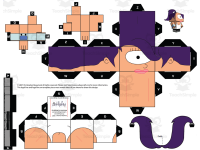
Papercraft Me Photoshop Activity preview 3
Papercraft Me Photoshop Activity preview 4

Look Inside · 10 pages

Step 01: Getting Started on Your Face, the Papercraft Me intro asking students to take a headshot facing the camera
Opening page of the Step 01 directions
Expression ideas (wink, serious, glasses) and step 1, get your picture taken, before opening the photo in Photoshop
Page 2 of the Step 01 directions
Steps 2 and 3: open Photoshop CC, learn about the Start workspace, and click the Open button to load your photo
Directions for opening Photoshop CC
Steps 6–8: open your headshot, then click Edit and point at Preferences to change the black background to gray
Steps 6–8 of the Step 01 directions
Steps 9–11: click Interface, pick the lightest color scheme, click OK; begins the list of five Photoshop sections
Steps 9–11 on changing the interface color
Photoshop's five interface sections listed, with notes on the Application bar, Window menu and Tools panel
Overview of the Photoshop interface sections
Tools panel guide: Marquee, Move, Lasso, Magic Wand, Crop, Brush, Eraser and more, plus Ctrl+D and zoom shortcuts
Explanation of the Tools panel
Foreground and background colors, step 12 on the Brush tool's Options bar, and the Layers and History panels
Options bar and Panels sections of the guide
Steps 13–14: click the History panel's Docked Panel icon to open it, then click again to collapse the panel
Steps 13–14 on Docked Panels
Steps 15–16: close the Libraries panel with Close Tab Group, then drag the History panel between Color and Layers
Steps 15–16 on rearranging panels
Attributes
Grades

Grade 7, 8, 9, 10

Types

Activities

Editable
No
Author
OK Products
Rating
Add To Collection
Add to collection Add to collection

About This Product

Students will work with digital tools in the Papercraft Me Photoshop Activity.

Students will create a paper version of themselves.

Step by step directions are included.

What's Included

1 zip file with:

1000+ JPG files

Word docs with step by step directions

.Html files with step by step directions

0 Reviews

Explore related searches
you may also like...

Check out these other great products