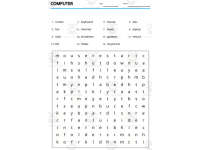
Vocabulary with Flash Cards | Crossword Wordsearch Anagram COMPUTER



- Grades
- Grades 4–8, Adult Education
- Pages
- 23
- File type
- Preparation
- Print ready


- Subject
- ELA, Vocabulary
- Topic
- Flash cards, Esl
- Resource types
- Games
- Preparation
- Print ready
- Standards
- L.6.6
Product description
From the author
Related resources
More resources teachers may find useful
24 related resources were found using this product's title, contributor, categories and tags.


In the classroom
Teaching tips & learning objectives

Learning objectives
Recognize and correctly spell 15 computer/technology vocabulary words across multiple activity formats.
Identify a target vocabulary word from a scrambled-letter anagram.
Match each vocabulary word to its corresponding pair or picture using process of elimination.

Teaching tips
Because no answer key is included, review the master word list (page 12 or 16) with students first, or keep it visible as a self-check reference during independent work.
The crossword's clues restate each answer directly (e.g., "mouse (5)"), so it functions more as a spelling/letter-count exercise than a true definitional crossword -- pair it with a separate vocabulary-definition discussion if deeper word knowledge is the goal.
Cut apart the flash card word labels (pages 20-23) and pair them with the picture pages (17-19) for a matching or memory-game center activity.

Skills covered
Anagram decoding — students unscramble letters to reconstruct each of the 15 target vocabulary words.
Word-to-word matching — two separate matching pages require connecting the same vocabulary set presented in different scrambled orders.
Crossword completion — students fill a 15-word crossword grid using letter-count-cued clues.
Good to know
Questions teachers ask about this resource
Does the crossword give definitional clues, or does it name the word directly?
It names the word directly. Each crossword clue simply restates the target word itself along with its letter count in parentheses (for example, "3. mouse (5)"), so the task is closer to a spelling/letter-placement exercise than a definition-based crossword.
Are there separate physical flash cards included, or only word lists?
The PDF includes picture-card pages and four pages pairing pictures with printed words (pages 20–23). Cut the picture and word areas apart for matching; blank card spaces are also supplied.

No reviews yet
Downloaded this resource? Tell other teachers how it went.
Curriculum
Standards, concepts & topics
Standards
 Standards
- L.6.6
Core concepts
 Core concepts
Computer vocabulary
Technology terms
Vocabulary games
 Topics
Explore more
Categories this resource belongs to
Explore related searches
More to explore
You may also like