File Management & Keyboard Speed Hacks Guide (SURV05)




About This Product
Stop dealing with lost Google Drive files and "Untitled" document chaos with the File Management & Keyboard Speed Hacks Guide (SURV05)! Designed for 1:1 Chromebook classrooms, Middle School Computer Tech, Advisory, Homeroom, ELA, Science, and STEM classes, this 3-page, print-ready packet equips students with crucial cloud drive organization skills, structured file naming formulas, and essential keyboard shortcuts.
What Is Included in This 3-Page Packet?
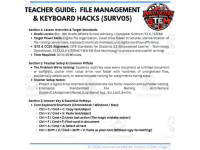
📋 Page 1: Teacher Guide & Lesson Plan
Features ISTE Technology Standards and Common Core alignment, common student digital clutter mistakes, teaching strategies, learning outcomes, answer keys, and a handy hotkey cheat sheet.
💻 Page 2: Student Mission Card & Practical Guide
Hooks students with a high-stakes scenario about a lost digital project minutes before a deadline. Features a high-visibility "Golden Rules" callout box introducing the Folder-First Rule, standardized file naming structures, and the Ctrl+Z safety net. Includes a visual diagram of a Master Digital Drive Folder Tree architecture.
⌨️ Page 3: Practical Application & Skill Reflection
Engages students in the "Hotkey Speed Matching Challenge" (pairing essential actions with Ctrl/Cmd shortcuts) and the "File Naming Makeover Challenge" (transforming chaotic file names into clean, searchable titles). Concludes with executive function reflections on digital workflow speed, plain-text pasting (Ctrl+Shift+V), and routine weekly drive maintenance.
Educational Value & Key Benefits:
Eliminates Lost Homework Excuses: Teaches students how to systematically organize Google Drive or OneDrive folders by subject and term.
Boosts Digital Speed & Efficiency: Master shortcuts like copy, paste, select all, find, and undo to increase computer productivity.
1:1 Classroom Essential: Perfect for technology orientation, digital citizenship units, computer lab resets, or back-to-school skill building across Grades 6–8.
Resource Tags
0 Reviews
Check out these other great products