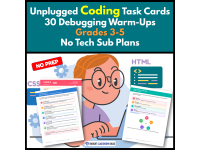
Unplugged Coding Task Cards | 30 Debugging WarmUps Grades 3-5 |No Tech



About This Product
Find the Bug: Debugging Warm-Ups | Grades 3–5 Computer Science
Find the Bug gives Grades 3–5 students engaging, no-tech debugging practice without requiring a specific coding platform. These debugging task cards help students learn to trace, test, explain, and fix broken pseudocode.
What’s Included
This resource includes six separate PDF files:
Teacher Guide – 6 pages
Teacher directions and implementation ideas
Teacher questioning script
Standards alignment
Scope and sequence
Two-week pacing option
Student Reference – 2 pages
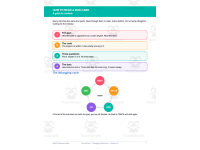
How to read a bug card
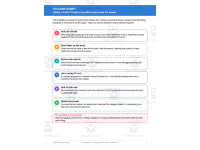
Seven-step debugging checklist
Read → Trace → Find → Fix → Test debugging cycle
Recording Pages – 2 pages
Student response sheets
Bug type identification
Fixed-line recording
Debugging progress tracker
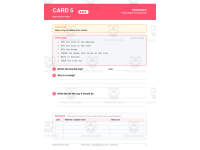
Bug Cards – 30 pages
30 ready-to-use debugging task cards
Six different bug types
Three difficulty levels
One card per page
Answer Key – 10 pages
Correct fixes for every card
Misconception behind each bug
Helpful teacher conferencing notes
The six bug types include Sequence, Loop Counting, Loop Conditions, Conditionals, Variables, and Placement.
How It Works in the Classroom
Use these debugging task cards in flexible ways throughout your computer science instruction.
⭐ Bell-Ringers
Project or print one card.
Students work independently or with partners.
A six-minute work period fits easily into a warm-up routine.
One card per day provides approximately six weeks of practice.
⭐ Stations
Print and laminate the cards.
Add the student response sheet.
Students solve cards and record their thinking.
Five cards provide a manageable station rotation.
⭐ Sub Plans
Provide the cards, checklist, response sheet, and answer key.
No student login or device is required.
No prior coding platform knowledge is needed.
Introduce the cards through discovery. Students encounter concepts by watching code break.
Standards & Learning Goals
Students practice:
Testing and debugging programs or algorithms.
Identifying and explaining coding errors.
Tracing code step by step.
Modifying existing algorithms.
Testing boundary cases.
Recognizing patterns in repeated reasoning.
Explaining why a solution works.
The resource aligns with CSTA 1B-AP-10, 1B-AP-11, 1B-AP-12, 1B-AP-15, and 2-AP-17. It also supports CCSS.MATH.PRACTICE.MP6, MP8, and CCSS.ELA-LITERACY.W.4.2.
Students also build practical debugging habits through the seven-step checklist. These include tracing values, checking starting values, checking stop conditions, reviewing order, checking indentation, and testing edges.
Why Teachers Love It
⭐ Misconception-focused answer key
The answer key explains the misconception behind each bug. This gives teachers better language for student conferences.
⭐ No devices required
Students can practice computational thinking without opening a coding platform.
⭐ Low-prep implementation
Print the cards and start using them as warm-ups, stations, or sub plans.
⭐ Built-in differentiation
Cards progress across three difficulty levels.
⭐ Focuses on thinking, not guessing
Students must find the bug, explain the problem, and write a fix.
⭐ Student reflection is included
The debugging tracker helps students see which bug types they solve most successfully.
Make debugging practice easier with a ready-to-use computer science resource for Grades 3–5.
Use Find the Bug for warm-ups, stations, targeted reteaching, or substitute plans. Give students repeated opportunities to trace, test, explain, and repair code.
Download the resource and give your students a practical way to build stronger debugging habits! 💛
0 Reviews
Check out these other great products