



Smartboard Attendance Checker
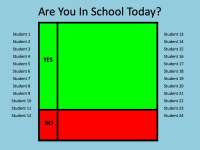
Personalize an attendance slide with your class names and display it on the classroom board for a morning check-in.

- Grades
- Not Grade Specific
- Pages
- 1
- File type
- Microsoft PowerPoint
- Editable
- Yes


- Subject
- Resources for Teachers, Classroom Management
- Topic
- Attendance, Smartboard
- Resource types
- Teacher Tools
- Editable
- Yes
Product description
From the author
Smartboard Attendance Checker
Related resources
More resources teachers may find useful
24 related resources were found using this product's title, contributor, categories and tags.



In the classroom
Teaching tips & learning objectives

Teaching tips
Replace the twenty-four placeholders with real names before the first use — the labels Student 1 to Student 24 exist to be overwritten
The layout is two columns of twelve, so a class larger than twenty-four needs the columns extended or a second copy of the slide
Because it is a single slide, it can be left open as the first thing on the board each morning rather than opened and closed for each use

No reviews yet
Downloaded this resource? Tell other teachers how it went.
Resource details
Concepts & topics
Core concepts
 Core concepts
Attendance routine
Classroom management
 Topics
Explore more
Categories this resource belongs to
Explore related searches
More to explore
You may also like

Activities


Worksheets & Printables, Worksheets

Worksheets & Printables, Worksheets

Teacher Tools

Teacher Tools, Worksheets

Teacher Tools