Award Certificates, Editable, End of Year, Color, Special Ed




- Grades
- Preschool–1, Elementary
- File type
- Editable
- Yes


- Subject
- Holiday & Seasonal, Holidays, End Of Year
- Topic
- Special Education, Award Certificates
- Resource types
- Classroom Decor, Worksheets & Printables, Worksheets
- Editable
- Yes
About this resource
What's inside this resource
Do you need end-of-the-year award certificates that you can customize for your Special Ed students? This Award Certificates, Editable, End of Year, Color, Special Ed is what you've been looking for!
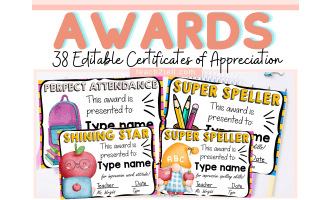
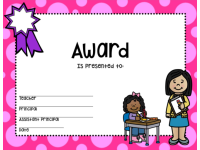
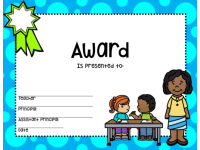
These Award Certificates, Editable, End of Year, Color, Special Ed are editable and have plenty of room for you to type in the goal achieved. There are 7 colors to choose from and 2 awards per color. The colors include vibrant pink, green, purple, red, yellow, orange, and blue. These certificates come with boy and girl picture options as well.
This Award Certificates, Editable, End of Year, Color, Special Ed resource was designed for students in Special Education classes, but could easily be adapted to any class, as these are editable certificates.
The Award Certificates, Editable, End of Year, Color, Special Ed is a ready to print and use resource because all you have to do is print them out fill in the information for each student. The word AWARD is at the top-center and you can add manually any specific reason for giving the award, or simply leave it blank.
With this Award Certificates, Editable, End of Year, Color, Special Ed resource, your students are sure to enjoy the end-of-the-year celebration!
Related resources
More resources teachers may find useful
24 related resources were found using this product's title, contributor, categories and tags.



In the classroom
Teaching tips & learning objectives

Learning objectives
Personalize a certificate for an individual student and achievement
Create consistent end-of-year recognition using varied color layouts

Teaching tips
Draft recipient names and award wording in a separate list first, then enter each set into the shaded certificate fields.

Skills covered
Recognition planning — Match award wording to an individual achievement
Document personalization — Enter names, dates, and signatory details in designated fields

No reviews yet
Downloaded this resource? Tell other teachers how it went.
Resource details
Concepts & topics
Core concepts
 Core concepts
Award certificates
End-of-year recognition
Editable personalization
 Topics
Explore more
Categories this resource belongs to
Explore related searches
More to explore
You may also like