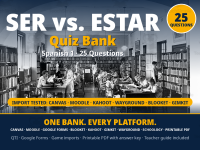
Ser vs. Estar Quiz Bank | 25 Questions | Canvas, Forms, Blooket



About This Product
One bank, ready for the platforms in the table below. One purchase gives you this Ser vs. Estar bank in every format in the table, so you stop rebuilding the same quiz for each platform.
Grades 6-12.
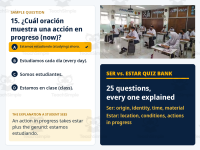
Media: 12 of the 25 questions carry media (10 photos, the question 15 video, and the question 17 animated GIF). The QTI file and the printable PDFs carry all of it. The Moodle file carries the photos. The game files and the Google Forms version are text only.
Some platforms limit import or assignment features by account plan, so check yours before purchase.
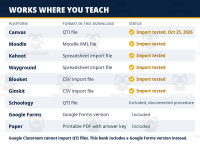
WILL IT WORK ON YOUR PLATFORM?
- Canvas (New Quizzes): QTI file. Import tested by EduLingo on October 25, 2026: all 25 questions imported correctly with answer keys, points, and feedback, and in student preview the photos rendered, the question 15 video played, and the question 17 animation ran. Import path: build a New Quiz, then More Quiz Actions, then Import Content
- Canvas (Classic Quizzes): QTI file. Documented import path (not import tested by EduLingo on Classic Quizzes): Settings, Import Course Content. EduLingo's live import test ran on New Quizzes only.
- Google Classroom: Google Forms version. Google Classroom cannot import QTI files directly. This download includes a Google Forms version that you can copy into your own Google account and assign through Classroom. EduLingo successfully copy tested the form from a second Google account on October 25, 2026, verifying all 25 questions, answer keys, points, and feedback. The copy link is printed in the included Forms PDF. The form copy contains the questions and answers but does not include the media from the QTI and printable versions. Teachers who want images in the form can add them manually using the printable quiz as a reference.
- Moodle: Moodle XML file (Moodle's native import format). Import tested by EduLingo on October 25, 2026: all 25 questions imported correctly into the question bank, with answer keys, points, and feedback. The file carries the photos. Import path: Question bank, Import, Moodle XML
- Schoology: QTI file. Documented import path (not import tested by EduLingo): import the QTI file into Resources, where it arrives as an assessment, then add it to your course
- Blooket: Blooket import file (CSV). Import tested by EduLingo on October 25, 2026: all 25 questions imported correctly. Import the set, then host a game or assign it as homework
- Kahoot: Kahoot import file (spreadsheet). Import tested by EduLingo on October 25, 2026: all 25 questions imported correctly. Import the questions, then host live or assign as a challenge with a deadline
- Gimkit: Gimkit import file (CSV). Import tested by EduLingo on October 25, 2026: all 25 questions imported correctly. Import the kit, then host live or assign as homework
- Wayground: Wayground import file (spreadsheet). Import tested by EduLingo on October 25, 2026: all 25 questions imported correctly, explanations included. Import the quiz, then run it live or assign it as homework
- Paper: Printable PDF with answer key. Print and hand out; the key prints an explanation for every answer, for fast grading and sub plans
ABOUT THIS BANK
This Ser vs. Estar bank gives you 25 ready to grade questions in the formats listed in the table above: a QTI file for Canvas, a native Moodle XML file for Moodle, a Google Forms version you can assign in Google Classroom, import files for Blooket, Kahoot, Gimkit, and Wayground for review days, and a printable PDF with the answer key for paper days and sub plans. The question content was audited before release, and the shipping files were live tested on October 25, 2026 on the platforms marked as tested in the table. Import the appropriate file, check that all 25 questions and correct answers are in place, and choose the settings that fit your class. The included 20-page teacher guide provides step-by-step instructions for importing, assigning, and managing the quiz on each supported platform.
The 25 questions cover the uses your Spanish 1 students actually mix up: ser for origin, profession, identity, possession, characteristics, telling time, the place and day of an event, and material; estar for location, conditions and states, and actions in progress. Every question carries a one sentence explanation, printed in the answer key and carried into the formats that show feedback, so a miss teaches something on the spot.
This bank teaches universal Spanish. Latin American and Peninsular forms are taught together, and the bank includes the vosotros forms where the paradigm calls for them (questions 9 and 19), because students meet both in real Spanish.
WHAT YOU GET (11 FILES IN ONE DOWNLOAD)
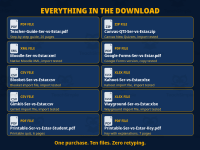
1. Introduction-Ser-vs-Estar.pdf: start here (2 pages): what is in this download, which file to open first, and your first ten minutes
2. Teacher-Guide-Ser-vs-Estar.pdf: the step by step teacher guide (20 pages): importing, time limits, attempts, availability windows, access codes, shuffling, one question at a time, monitoring students while they work, extra time and accommodations, reading results, and troubleshooting for every platform above
3. Canvas-QTI-Ser-vs-Estar.zip: the QTI package for Canvas, import tested in New Quizzes; Schoology's documented import uses this same file
4. Moodle-Ser-vs-Estar.xml: the Moodle XML file, import tested in Moodle
5. Google-Forms-Ser-vs-Estar.pdf: the Google Forms version, with the copy instructions and every question, key, and feedback line in print
6. Blooket-Ser-vs-Estar.csv: Blooket import file, 20 seconds per question preset
7. Kahoot-Ser-vs-Estar.xlsx: Kahoot import spreadsheet, 20 seconds per question preset
8. Gimkit-Ser-vs-Estar.csv: Gimkit import file
9. Wayground-Ser-vs-Estar.xlsx: Wayground import spreadsheet, explanations included, 20 seconds per question preset
10. Printable-Ser-vs-Estar-Student.pdf: the printable quiz (6 pages)
11. Printable-Ser-vs-Estar-Key.pdf: the printable answer key with an explanation for every question (7 pages)
QUESTIONS TEACHERS ASK
Does this work with Google Classroom? Yes, through the included Google Forms version. Google Classroom cannot import QTI files directly, and this bank does not pretend otherwise. You make your own copy of the form and assign it in Classroom. When the form is the single attachment on the assignment, you can import the scores from the form into the Classroom gradebook. EduLingo tested the copy step; the Classroom assignment step itself was not tested.
Do I need to type the questions in? No. All 25 questions are already included in the import files, the Google Forms copy, and the printable quiz. You do not need to retype them. The Google Forms copy includes the answer keys, points, and feedback, but its media must be added manually if you want images in the form. Media by format: the QTI file and the printable PDFs carry the photos, the question 15 video, and the question 17 animation; the Moodle file carries the ten photos; the game files and the Forms version are text only.
Can I edit the questions? Yes. After import, the questions live in your account and are yours to change. The printed answer key always matches the original bank.
Which Canvas does this fit? The QTI file was import tested in Canvas New Quizzes on October 25, 2026. If your school uses Classic Quizzes, Canvas documents an import route for the same file (Settings, Import Course Content), but EduLingo has not import tested it on Classic Quizzes.
What if my platform is not in the table? If your platform's documentation lists QTI import, try the QTI file first. EduLingo has not tested it outside the platforms in the table. Moodle does not take QTI; its native import format is Moodle XML, which is why this download carries a separate Moodle XML file. And the printable PDF works everywhere paper does.
EduLingo is not affiliated with Canvas, Instructure, Google, Moodle, Blooket, Kahoot, Gimkit, Wayground, Schoology, or PowerSchool. Platform names are used only to describe compatibility.
ACTFL connection: This resource is aligned with the ACTFL World-Readiness Standards for Learning Languages and the Novice High Can-Do statements for interpretive communication. Students interpret short sentences and questions and show they can choose ser or estar correctly for origin, identity, profession, possession, characteristics, telling time, location, conditions, and actions in progress.
See the whole catalog in the EduLingo store here on TeachSimple.
Follow EduLingo on Facebook for new releases, sale rounds, and free resources.
If this bank earns its place in your classroom, an honest review here on TeachSimple helps other teachers find it.
Resource Tags
0 Reviews
Check out these other great products