



3,932 products added recently
Page 9 - Popular Templates
Our collection of Popular Templates features the most widely used and versatile resources among educators. These templates span various subjects and grade levels, including worksheets, graphic organizers, lesson plan formats, and activity sheets. They are designed to save you time and enhance the effectiveness of your teaching. By incorporating these tried-and-true templates into your classroom, you benefit from tools that have been proven to engage students and support learning objectives.

 Show filters

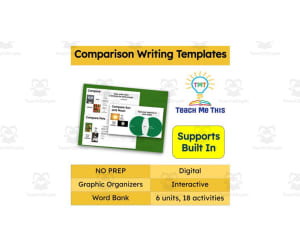
Comparison Writing Templates | Digital Graphic Organizers
ELA, Strategies, Grade 1, 2, 3, 4, 5, Templates, Teacher Tools
This resource is jam-packed with digital comparison writing templates that will give your students multiple opportunities to compare and contrast. There are graphic organizers for each topic. Topics included: -Drinks -Pets -Sun and Moon -Treats -Seasons -Fruits and Vegetables Each lesson has 2 comparison activities and 1 writing template.
Author Teach Me This
Tags Interactive Slides, Comparison, Writing, Templates, Graphic Organizers

Editable I Am Poem Template – 13 Writing Prompts
Poetry, Literature, ELA, Creative Writing, Writing, Middle School, High School, Templates, Writing Prompts, Worksheets & Printables
Editable I Am Poem Template This resources is designed specifically for students. This resource includes 13 engaging prompts. What's Included: minimalist, easy-to-use template: that allows students to focus on their writing without distraction. 13 thoughtfully crafted prompts: that inspire self-reflection and creativity. Helping students delve into their unique perspectives. Prompts Include: I am I was born to I think about I feel at peace when I fear I am most proud of I am defined by I am inspired by I find joy in I have learned that I hope for I believe I will Features: Editable: Editable format for customization to suit your classroom needs. Instructions: Clear instructions to help students understand the activity. Versatile: Perfect for individual or group activities, encouraging discussion and sharing. Grades: Ideal for grades 6-12 promoting literacy and emotional development. This resource includes: 2 pages (PowerPoint) US Letter (8.5" x 11") size This template can be used in writing centers, as a warm-up activity. Or as part of a larger unit on identity and self-expression. It’s perfect for building confidence in young writers or students. Helping them articulate their thoughts and feelings.
Author GY Creations
Tags I Am Poem Template, I Am Poem, Editable I Am Poem, Editable Template, Creative Writing, Poetry, Poem Writing, Printable, Self-reflection

Kindergarten Book Report Templates for Winter Holiday
ELA, Reading, Reading Comprehension, Preschool, Grade 1, Templates, Teacher Tools
Discover four unique Holiday or Winter-themed booklets in this resource, each accompanied by comprehension strategies or elements. (main idea, sequencing, setting, character) Each booklet contains a total of 4 pages for students to enjoy independently or with the teacher's guidance. If your students are reading independently these engaging book report templates will work great in your Holiday Centers . Tip: Simply print the four pages, fasten them with a staple along with the cover on top, and let students cut out all 4 pages simultaneously. This easy process gets their booklets ready in no time! Explore the optional lesson plan, perfect for reading sessions with your students. Don't forget to browse through some of our favorite books listed in the thumbnails that pair ideally with these templates. LESSON PLAN FOR EACH BOOKLET Objective - Students will be able to identify an element in a story. (main idea, setting, character, & sequence) Materials - scissors, stapler, colored pencils/crayons, pencil, eraser, winter/holiday themed books, and booklet pages. Monday - Introduce the element. Use a short storybook to demonstrate the element. If you haven't introduced Title and Author this is a great time to do so. Tuesday - Review the element. Review the title and author. Reread a story from the day before for students to identify the element. Direct the students to help you write a sentence about the story/element. Have students copy it to paper. Wednesday -. Read a story that matches the element in the booklet you will use. (mitten, penguin, gift, stocking) Allow the students to discuss the identity of the element. Have them write their own sentence on paper. Thursday - Reread the story from Wednesday. discuss the element again discuss the title and author pass out the 4 pages stapled together for students to cut. create the booklet and walk students through the pages of the booklet (students who need more time can finish on Friday. Friday - Complete the booklet. Pass out exit tickets to identify the element learned. (you can write the 4 elements on the board for students to choose from)
Author The Kinder Lady
Tags Book Reports, Comprehension, Kindergarten Reading, Winter Holiday Reading, Book Report Templates, Holiday Book Reports, Writing Sentences, Reading Books
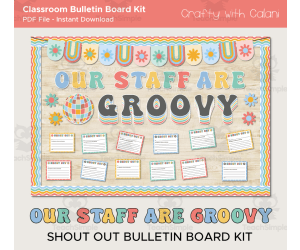
Staff Shout Out Bulletin Board – Groovy Design
Special Resources, Social Emotional Learning (SEL), Social Skills, Community Building, Resources for Teachers, Not Grade Specific, Bulletin Boards, Classroom Decor, Door Decor, Templates, Teacher Tools
Staff Shout Out Bulletin Board in Groovy Design Infuse some positivity to your workplace with our Groovy Staff Shout Out Bulletin Board! A perfect space for everybody to show their appreciation for a job well done, a kind gesture or simply grin the extra mile to any staff members. Out bulletin board will not only make your workplace looks good, it will also create a positive atmosphere in your workplace by promoting a culture of recognition and appreciation. The Groovy design will create a calming yet beautiful wall decoration too. Package Components: Board Border Design Board Bunting Design Design elements as shown on the listing's photo Individual letters that spells out as shown on the listing's photo 2 types of shout out cards - in color and also black and white design A guide for printing adjustments based on image size preferences. Please note that the display space suggested for this birthday board is roughly 4 x 6 feet. The actual measurements might vary based on your choices of letter spacing or component separation distances. Potential Uses: Serving as a way to show appreciation for any staff member who are doing a good job Encourage students or other staff member to express their gratitude Promote a positive and motivating workplace environment Software Requirements: The file is in pdf format. To open and print the file you will need to use the FREE adobe reader software. Make sure you have it installed in your computer.
Author Crafty with Calani
Rating
Tags Teacher Shout Out, Staff Recognition, Staff Appreciation, Shout Out Board, Workplace Motivation, Team Recognition, Office Appreciation, Staff Shout Out Bulletin Board, Groovy Staff Apprection Board, Groofy Staff Shout Out Board

Baseball Review (Google Slides Game Template)
Resources for Teachers, Classroom Management, Not Grade Specific, Templates, Teacher Tools
This is a Google Slides editable Baseball Review game template. This review game is generic and works with any subject area. On each “Single”, “Double”, “Triple” and “Home Run” slide, simply type in your question. Keep the answers to your questions jotted down, as they do not go on the Slide. Everything is already hyperlinked to go to the correct slides, so no links need to be added. Your students will have fun while reviewing content.
Author Roombop
Tags Google, Games, Slides, Review Games, Baseball Game Review, Teaching Baseball Sliding, Baseball Google Classroom, Google Classroom Games Baseball, Play Review Template, Google Classroom Baseball, Google Baseball Google Classroom

Four Types of Sentences Interactive Notebook Templates and Posters
ELA, Grammar, Grade 3, 4, 5, 6, Templates, Teacher Tools
Enhance your students' learning with these captivating notebook templates and educational posters. These interactive resources engage students, making their learning process enjoyable and effective. Explore the nuances of declarative, imperative, interrogative, and exclamatory sentences with practical exercises. The vibrant and informative posters reinforce essential aspects of each sentence type, ensuring a deeper understanding. Available in both American and British English, catering to different spelling and terminology preferences. Contents: 1 Interactive Notebook Template in PDF format (American English) 1 Interactive Notebook Template in PDF format (British English) 8 Dual-style Posters (color and black & white) featuring explanations and examples for the four sentence types 8 Additional Color Posters with definitions and examples Poster dimensions are 8.5x11 inches and A4, suitable for diverse settings. Overview of Notebook Templates Notebook Templates 1 & 2: Include a cover sheet for defining the four sentence types and a response sheet for writing examples. Two variations are available. Notebook Templates 3 & 4: The cover sheet provides definitions, and the response sheet is for writing examples. Two variations are available. Notebook Template 5: Features visuals on the cover sheet, with the response sheet designed for writing example sentences. Notebook Template 6: Interrogative sentences are presented on the cover sheet, with a response sheet for writing imperative sentences. Notebook Template 7: Declarative sentences are on the cover sheet, and the response sheet is for writing interrogative sentences. Notebook Template 8: Displays all four sentence types on the cover sheet, with a response sheet for sentence type identification. Templates 9-12: These are designed for writing descriptive paragraphs based on picture prompts, using the four sentence types, with color coding for sentence identification. Related Resources Sentence Structure Task Cards Sentence Type Task Cards and Posters Opinion Writing Posters
Author Teach2Tell
Tags Types Of Sentences, Kinds Of Sentences, Four Types Of Sentences, Declarative Sentence, Imperative Sentence, Interrogative Sentence, Exclamatory Sentence, Sentence Types, Sentence Structure, Writing Sentences

Animal Report Poster Template – Nonfiction Writing
Science, Life Sciences, Animals, Research, Grade 2, 3, 4, Templates, Teacher Tools
This is a Nonfiction Animal Report Poster Template that your students will love. This is great for incorporating into your reading block or study on animals. Students will get to read and write about their animal and display it on the poster templates. This poster will allow students to write and research an animal of their choice. These will make a great display on your bulletin board or in the hallway. This can also be a great presentation poster that students can present to the class. Students can work on this activity in class or it can be assigned as a take home project. Order, Outline and Steps- very simple, just choose which template you want to use and print. Alternatively you can also print various templates and have your student choose. Grades or Ages- can be used from 2nd grade to upper 4th-6th grades. Implementation Format- can be implemented at any time of the school year or to fit an animal unit within your curriculum. File Types- this file comes as a PDF that can be printed on a standard sheet of 8.5"x11' paper. However, you can also print on a tabloid paper and glued on a colorful sheet of construction paper as a nice background if you wish. Total Number of Pages- 8 pages are included. Each page has a section for the animal name, picture of the animal, animal habitat, predators, what the animal eats, and some fun facts. Breakdown of Pages Include: Example page (tiger) My Animal Report My Insect Report Three additional templates with blank titles and headers for students to include their own interesting topics.
Author CraftEdPrints
Rating
Tags Nonfiction Report, Research Report, Animal Habitats, Animal Report, Animal Poster, Creative Writing, Literacy, Graphic Organizers, 3rd Grade Animal Research Project Template, How To Write An Animal Report

Editable - Self-Checking I Spy Template - Digital Activity Vol.1
Resources for Teachers, Classroom Management, Not Grade Specific, Templates, Teacher Tools
Editable - Self-Checking I Spy Template - Digital Activity Vol.1 A powerful and innovative teaching resource, geared towards energizing the learning process and providing instantaneous feedback to students. This pre-formulated template allows teachers to develop their educational content effortlessly, making instruction engaging and adaptive. Utilization of Google Sheets Platform for Creation The product creates varied self-checking, self-grading activities based on a 15-question I Spy template which can be adapted to any subject matter or grade level in an in-person or virtual learning space. The Unique Interactive Principle Kids are stimulated through an unfolding image that reveals itself progressively as questions are answered correctly; this visual reward system piques learner curiosity and motivates problem solving. Mistakenly answered questions turn red instantaneously - signaling learners to revisit and correct their responses without delay. Instruction Simplified for Teachers, Educators simply input questions along with the corresponding answers into designated cells transforming Google Sheets into a powerful tool for creating homework assignments or quizzes. Saving Teachers' Time, This digital tool eliminates manual grading tasks from teachers' workloads as it grades student responses automatically while educators gain perspective about student comprehension helping pinpoint areas needing further attention or reinforcement! Further Simplicity Provided Through Additional Resources such as, Detailed written instructions simplifying usage of this digital product's features Educational videos which further streamline its application, enhancing educators' comfort with integrating technology into classrooms thereby improving overall management efficiency Note: Although designed exclusively for personal use within classrooms under single-user license, the Editable - Self-Checking I Spy Template - Digital Activity Vol.1 is a uniquely comprehensive product, aiming towards embellishing academics through modern-day resources; it truly represents an outstanding blend of simplicity and innovation that addresses the needs of present-day educators while captivating student interest.
Author Digitally Yours Shop
Tags Self-checking, Interactive, Digital Activity, Google Sheets, Automatic Grading

Classroom Division Facts Posters, Math Decor in Neutral Boho Design
Math, Counting, Early Math, Numbers, Multiplication and Division, Division, Grade 1, 2, 3, Teacher Tools, Charts, Classroom Decor, Posters, Templates, Anchor Charts
Decorate your classroom wall and make learning multiplication exciting with out Neutral Boho Classroom Division Facts Charts! These vibrant and eye-catching posters cover division facts from 1 to 12, and it will capture your students’ attention, helping them to master division facts in a fun way. This set comes in four calming design styles (full page and half page), so you'll have plenty of options to choose from for your classroom Why you need this times tables start: ♥ Comprehensive Multiplication Learning – Covers division facts for numbers 1–12. ♥ Eye-Catching Designs – calming and easy-to-read visuals help students understand the concepts ♥ Versatile Use – Use it as math anchor charts, small group or individual learning aids, or desk references. How to incorporate these posters into lessons ♥ Math Wall Displays – Use these times table posters on math bulletin boards for easy reference. ♥ Group Activities – Use them for group work to support collaborative learning. ♥ Individual Practice – Print them smaller and use as flashcards or desk references for independent practice. What will you get ♥ All documents are in pdf formats and come in 2 different paper standards, US ANSI & International paper. ♥ Division Facts Posters in two styles, full page and half page versions ♥ Half page version comes in 2 different sizes options, make it possible to print on bigger paper size ♥ an ink-friendly black & white version. Print them on colored paper for a vibrant look while keeping it ink friendly.
Author Crafty with Calani
Rating
Tags Home School Poster, Math Poster, Preschool Poster, Math Classroom Decor, Early Math Poster, Division Facts Poster, Division Concept Poster, Division Math Poster, Neutral Boho Division Chart, Neutral Boho Math Display
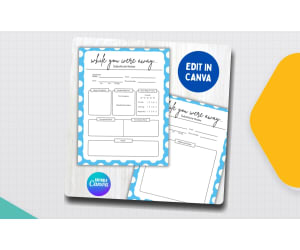
Substitute Teacher notes Report Forms Editable While you Were Out
Formal Writing, Writing, ELA, Classroom Management, Resources for Teachers, Not Grade Specific, Templates, Teacher Tools, Worksheets & Printables
Teachers can leave this substitute form on their desk for the guest teacher to fill out, making it an essential, professional addition to any emergency sub binder. For guest teachers, this layout serves as the perfect substitute teacher notes sample. Easily record all the day’s activities, behavior notes, and accomplishments on these fillable Substitute Teacher Report Forms so the homeroom teacher knows exactly what happened while they were away. Why Teachers Love It Great for organization! It provides a clear, structured way for guest teachers to communicate about lesson progress, student behavior, and any messages from the office. Fully editable in Canva, allowing you to easily customize the text, fonts, and categories to fit the specific needs of your classroom. What’s Included 1 Editable Canva template link for the substitute teacher notes 8 Ready to print PDF & PNG files Formatted for standard US Letter size (8.5" x 11") Grades / Ages Applicable for all grades Implementation Format Perfect for emergency sub binders, planned teacher absences, or substitute teacher toolkits Answer Key Not applicable File Type PDF and PNG files (Canva Editable Template Link) Number of Pages 8 page License Paid product for personal or single classroom use
Author screenzro
Rating
Tags Substitute Teacher Notes, While You Were Away Sub Notes, Substitute Form For Teacher, Substitute Teacher Report Template, Substitute Teacher Notes For Teacher, Substitute Teacher Report Forms, Sub Notes Template
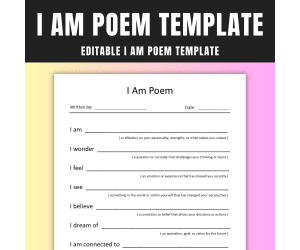
Editable I Am Poem Template for Older Students with Instructions
Poetry, Literature, ELA, Creative Writing, Writing, Elementary, Middle School, Not Grade Specific, Activities, Assessments, Teacher Tools, Templates, Writing Prompts, Worksheets & Printables
Editable I Am Poem Template This resources is designed specifically for older students. This resource includes 10 engaging prompts. What's Included: minimalist, easy-to-use template: that allows students to focus on their writing without distraction. 10 thoughtfully crafted prompts: that inspire self-reflection and creativity. Helping students delve into their unique perspectives. Prompts Include: I am I wonder I feel I see I believe I dream of I am connected to I struggle with I am not I hope Features: Editable: Editable format for customization to suit your classroom needs. Instructions: Clear instructions to help students understand the activity. Versatile: Perfect for individual or group activities, encouraging discussion and sharing. Grades: Ideal for grades 6–12, promoting literacy and emotional development. This resource includes: 1 page (PowerPoint) US Letter (8.5" x 11") size This template can be used in writing centers, as a warm-up activity. Or as part of a larger unit on identity and self-expression. It’s perfect for building confidence in young writers or students. Helping them articulate their thoughts and feelings.
Author GY Creations
Tags I Am Poem Template, I Am Poem, Editable I Am Poem, Editable Template, Creative Writing, Poetry, Poem Writing, Fun Activity, Printable

Me! Week-Long Lesson Plan Template
ELA, Math, Early Math, Reading, Kindergarten, Templates, Teacher Tools
Me! Week-Long Lesson Plan Template Introduction The Me! Week-Long Lesson Plan Template is an indispensable tool designed to aid preschool teachers in organizing their week-long agendas effectively. This editable 2-page Word document allows for comprehensive lesson planning, from Circle Time to Art, Science, Language/Literacy, Dramatic Play and Math. Using the Template Filling up this template is intuitive; the segments are refillable which allows educators to insert personalized notes and activities that cater to their classrooms' unique environment. This flexibility enables teachers to add or swap activities based on various factors such as available resources, students' responses toward different learning styles and more. Circle Time : Incorporate theme-based stories that promote conversation skills or introduce new vocabulary. Movement: Plan rhythmic exercises involving counting numbers or identifying shapes for bilateral integration. Dramatic Play: Pencil down engaging role-playing scenarios as language development boosters. The Flexibilty Factor This adaptable formatting gives you plenty of space for experimentation under each category. Modifying course directions based on student background knowledge about certain topics becomes significantly simpler using this template. Whether it’s designing number-related games under the Math section or scheduling hands-on experiences in the Art & Science domains – you can do it all with our template! Note: Remember - effective teaching doesn’t always need set rules even when using lesson plans! Tailoring Instructions For Different Learning Modalities & Homework Assignments: You can include instructions for both group assignments as well individual homework assignments making this useful tool extremely versatile. Conclusion Bring in order to the bustling environment of a preschool classroom with the Me! Week-Long Lesson Plan Template. Coupled with your passion for teaching young minds, it becomes an invaluable ally every educator could benefit from.
Author Learning Foundations
Tags Preschool Planning, Lesson Organization, Customizable Template, Flexible Scheduling, Diverse Learning Modes
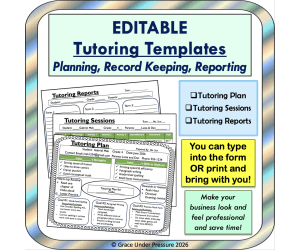
Tutoring Business Plan Templates: Tutoring Session Graphic Organizers
Resources for Teachers, Not Grade Specific, Teacher Tools, Graphic Organizers, Templates
Are you thinking of starting your own tutoring business or getting some tutoring students in elementary school or high school to supplement your teaching income? Here are ready-to-go, editable tutoring templates that you can use to plan your sessions, record what you accomplish, and report back to your students’ parents. This will give your business a professional look while saving you time: the templates have all the information you need and nothing you don’t! How to Use: a) Tutoring Plan: Create a tutoring plan for each student. This can be done when a student starts working with you and should last for at least 3-6 months. This one-page sheet highlights the student’s strengths and the skills they need to work on. It has room for you to plan routines (warm-up and rewards) and three key areas that you will work on with the student- including the resources you will use. You can gather information from the parents, the student’s teacher, and report cards or previous assessments for developing this plan. You can share the completed plan with the parents (and the student if it is age-appropriate). You can print a copy or type into the slide. Check out a completed sample to see how to use this page. b) Tutoring Sessions: Print a tutoring sessions sheet for each of your students. One sheet will last ten sessions. You can record the date and time of the session and all the activities you complete along with the resources you use. This will make prepping for the next session much easier- using your tutoring plan and this record sheet will allow you to always know what comes next. You can also record your payments here. Check out a completed sample to see how to use this page. What activities would you prep for Gabriel’s third session? c) Tutoring Reports: Write a simple, one-paragraph report each term you tutor (every 3-4 months). You can describe work habits, skills you have worked on, and areas of growth you have noticed. Share with the parents. I have included a version with lines (for printing and writing on) and a version with no lines (for typing into and emailing). These three templates will ensure you are prepared and professional as you embark on your tutoring journey!
Author Grace Under Pressure
Rating
Tags Tutor, Tutoring, Tutoring Record Sheets, Tutoring Templates, Tutoring Business, Tutoring Planning Sheets, Tutoring Plan, Tutor Business, Tutor Sheets

Editable Jeopardy Template
, Not Grade Specific, Templates, Teacher Tools, Activities, Games
Do your students love whole group games ? Are you always searching for more games that students can play to review a variety of skills? We know that children love playing games and we love it for them because we know how much games can solidify students’ learning. One game that students love is Jeopardy! If your students have never played it, they are sure to catch on quickly. For most classrooms, Jeopardy is meant to be a whole group game in which students can be placed in small teams. Everything is ready for you with this awesome Jeopardy template. All you need to do is fill in the categories, questions, and answers where it tells you to, and you are ready to go. Finally...a template you can use for ANYTHING! You can use this with your math class, science class, language arts class, etc. This template has 62 slides and is built with 6 categories and 5 questions per category. This template can be accessed with a Google link and a PowerPoint is also included with the template. I hope you enjoy! Here are links to similar resources in my store: Kindergarten Writing Rubric My Vocabulary Journal CVC Wheels Activity #3 Synonyms and Antonyms Game Vocabulary Bingo Game Vocabulary Checkers Game Check Out More Resources from My Store: Hook Learn and Tinker
Author Hook Learn and Tinker
Rating
Tags Whole Group Games, Editable Game Template, Jeopardy Game, Jeopardy Template, Template, Jeopardy, Game, Classroom

Dr. Seuss Week-Long Lesson Plan Template
Creative Arts, Art, ELA, Math, Early Math, Kindergarten, Templates, Teacher Tools
Dr. Seuss Week-Long Lesson Plan Template The Dr. Seuss Week-Long Lesson Plan Template is a comprehensive, editable teaching resource. It aids preschool teachers in the creation of engaging and educational lessons stretching over a week. Document Structure & Contents The lesson plan is prepared according to the unique themes presented in popular Dr. Seuss books, giving an unmatched structure while also providing space for changes as per students' needs. It's crafted in Microsoft Word and spans 15 pages featuring detailed sections for every day which include: Circle Time , Movement, Art, Science, Language/Literacy, Dramatic Play, Math, and >. This product offers numerous possibilities - making it useful in public school classrooms or homeschooling setups alike. It can be used during whole group instruction where teachers can drive discussions centered around each daily theme from days of the planned week. In smaller group settings, focused attention towards each child's learning progress during activity-based sessions like Art or Dramatic Play time can be given too. Furthermore, individual sections could function as homework assignments, with parents taking charge at home! Tailoring Education With The Lesson Plan! The most distinguishing character of this lesson plan template lies within its flexibility. This means educators are equipped with assurance that they’re guiding their young learners with intentionality geared towards optimum growth every day across multiple domains of developmental importance. Using the template effortlessly, educators can embrace a rich classroom atmosphere while ensuring their teaching pathway throughout the week encourages beneficial outcomes for students!
Author Learning Foundations
Tags Dr Seuss, Lesson Plan Template, Preschool, Circle Time, Science
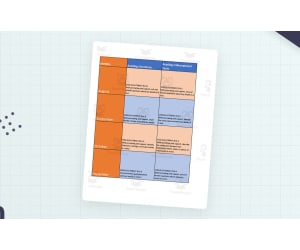
Curriculum Map Template Kindergarten Freebie
, Preschool, Templates, Teacher Tools
This is a Curriculum Map Template for Kindergarten. It covers all math, language arts, social studies and science standards for Kindergarten. This is an Excel file that is fully editable for you to adjust to meet your needs.
Author DK's Creations
Tags Template, Instruction, Planning, Curriculum Map, Freebie Meet The Teacher Template, Curriculum Mapping Template Excel, Curriculum Map Template Free, Curriculum Overview Template

Staff Shout Out Bulletin Board – Fruit Theme
Special Resources, Social Emotional Learning (SEL), Social Skills, Community Building, Resources for Teachers, Not Grade Specific, Bulletin Boards, Classroom Decor, Door Decor, Templates, Teacher Tools
Staff Shout Out Bulletin Board in Sweet Fruit Design Infuse some positivity to your workplace with our Fruit Staff Shout Out Bulletin Board! A perfect space for everybody to show their appreciation for a job well done, a kind gesture or simply grin the extra mile to any staff members. Out bulletin board will not only make your workplace looks good, it will also create a positive atmosphere in your workplace by promoting a culture of recognition and appreciation. The Fruit design will create a calming yet beautiful wall decoration too. Package Components: Board Border Design Board Bunting Design Design elements as shown on the listing's photo Individual letters that spells out as shown on the listing's photo 2 types of shout out cards - in color and also black and white design A guide for printing adjustments based on image size preferences. Please note that the display space suggested for this birthday board is roughly 4 x 6 feet. The actual measurements might vary based on your choices of letter spacing or component separation distances. Potential Uses: Serving as a way to show appreciation for any staff member who are doing a good job Encourage students or other staff member to express their gratitude Promote a positive and motivating workplace environment Software Requirements: The file is in pdf format. To open and print the file you will need to use the FREE adobe reader software. Make sure you have it installed in your computer.
Author Crafty with Calani
Rating
Tags Teacher Shout Out, Staff Recognition, Staff Appreciation, Shout Out Board, Workplace Motivation, Team Recognition, Office Appreciation, Staff Shout Out Bulletin Board, Sweet Staff Appreciation Board, Fruit Staff Shout Out

Jeopardy Game Template (Google Slides)
Resources for Teachers, Classroom Management, Not Grade Specific, Templates, Teacher Tools
This is a Google Slides editable Jeopardy game template. Jeopardy is great for a fun and interactive way to review information. You can insert all your own information and all the slides are linked for you, ready to go. If you click the question the student wants to answer it will go directly to that slide. If you click "answer" you will go directly to the answer. Features: - Game board colors match the game. It has a realistic feel. - Sounds; applause, incorrect and a timer.! Look at the bottom left of each page. - Make your own copies with a single click **Updated with Bonus files: Printable Answer Tracker: Have your students fill in the answer sheet as you play the game. They can keep track of their own score and see how well they can do. Character Money Totals: Keep track of money totals as you play. Have this on a separate tab and or have a student or all your students in charge to keep track of the totals on their own Chromebooks. Included is 3 types of totals, great for playing in groups of 2, 3 and 4. ---- 2 groups: Ketchup vs Mustard - 3 groups: Gorilla vs Lion vs Bear - 4 groups: Gorilla vs Lion vs Bear vs Tiger
Author Roombop
Rating
Tags Jeopardy Game Template, Make Your Own Jeopardy Google Slides, Google Slides Jeopardy Template, Jeopardy Template Download, Jeopardy Game For Classrooms, Jeopardy Game Teachers, Jeopardy Slides, Jeopardy Game For Students

Sight Words Record Sheet + Flashcards
Reading, ELA, Grade 2, Assessments, Teacher Tools, Graphic Organizers, Templates
This is a great tool for teachers to record and document the progress of their student's sight word recognition. This is a one page sheet that allows you to check off if a student can read each sight word listed below (46 words). It is quick and easy to analyse, this is something I like to add to my student's reading portfolio or work folder to show during student conferences. Additionally, this product comes with a set of flashcards that can be used to practice the sight words that student's may need additional practice with. 1. always 2. around 3. because 4. been 5. before 6. best 7. both 8. buy 9. call 10. cold 11. does 12. don’t 13. fast 14. first 15. five 16. found 17. gave 18. goes 19. green 20. it's 21. made 22. many 23. off 24. or 25. pull 26. read 27. right 28. sing 29. sit 30. sleep 31. tell 32. their 33. these 34. those 35. upon 36. us 37. use 38. very 39. wash 40. which 41. why 42. wish 43. work 44. would 45. write 46. your - - - - - - - - - - - - - - - - - - - - - - - - - - - - - - - - - - - - - - - - - - - - - - - - - - - - - - - - - - - - - - - - - - - - - - - - - - - - - - - - - - - - - - - - - - - - - - - - - - - - - - - - - - - - - - - - - - - - - - - - - - - - - - - -
Author CraftEdPrints
Tags Sightwords, Secondgrade, Secondgradesightwords, Doltchwords, Dotchwordsforsecondgrade, Dotchwordsfor2nd

PowerPoint Template with Computer Screen and Teacher
, Not Grade Specific, Templates, Teacher Tools
This resource is a PowerPoint Template with Computer Screen and Teacher. These editable templates are great for back to school presentations like meet the teacher and rules/procedures.
Author Surfer Kids Clip Art
Tags Template, Back To School, September, August, Presentation

High School: A Student's/Homeschooler's Guide to Professional Email
ELA, Life Studies, Business, Research, Resources for Teachers, High School, Homeschool Resources, Adult Education, Worksheets & Printables, Teacher Tools, Writing Prompts, Templates
As a homeschool mom with a 9th grader of my own, I have realized pretty quickly just how high the stakes get as they hit high school. Suddenly, our kids are expected to reach out to co-op teachers, talk to college recruiters, or apply for that first part-time job—and they are expected to do it like professionals. I started calling it the "digital handshake" because, in many cases, that first email is the only impression people have of them. I created this guide because I wanted my own teen to have the confidence to hit "send" without second-guessing herself. This is not just another dry lesson on grammar; it is about giving our young adults a life skill that actually opens doors for them. INCLUDED IN THIS RESOURCE: Comprehensive student guide Printable Quick-Start Desk Cheat Sheet Parent/Mentor Review Guide & Commitment Page Technical How-To guides (e.g., Schedule Send) TOPICS COVERED: Crafting professional subject lines and signatures Templates for late work, follow-ups, and inquiries Email etiquette for sensitive topics and busy professionals Essential digital safety and mobile communication tips At the end of the day, The Digital Handshake is about more than just checking off a curriculum box; it is about watching our kids grow into independent, capable adults. We have all seen how easy it is for teens to stay stuck in "text-speak" mode, and my goal with this guide was to turn those hesitant texters into clear, confident communicators. Whether they are headed for college or straight into the workforce, I want our kids to be able to share their thoughts and needs with total professionalism. I truly hope this resource helps your student/homeschooler step into their future with their best foot forward. If you and your students/homeschoolers enjoyed this resource, please leave a review. Thank you for your support! Tina - Big Easy Homeschooling Mom
Author Homeschool with Big Easy Homeschooling Mom
Rating
Tags High School Email Etiquette, High School Life Skills, How To Write Professional Emails For Students, High School Email Etiquette Curriculum, Student/homeschool Email Templates, Career Skills For Teens, Professional Writing For Homeschoolers, Teaching Digital Communication, How To Email A Professor For The First Time, Business Writing For High School

South America Geography Project Template for MS Word
Social Studies, Geography, Grade 3, 4, 5, 6, 7, 8, Templates, Teacher Tools
South America Geography Project Template for MS Word This comprehensive teaching resource is expressly designed for instructors in social studies and geography. This tool functions as an excellent foundation for project work about South American countries. The template encompasses individual pages dedicated to different countries. Each page contains a country's flag, and a map excluding cities - creating an effective reference point from where learning can begin. This platform allows students to add preferred cities, rivers, or lakes on their own, thus widening their understanding about unique geographic aspects of each country. The highlight feature is its flexible nature - it is fully editable! Teachers can distribute these pages as Word documents enabling interactive learning either via electronic devices or printed paper. Ideal for 3rd-grade through the 8th-grade learners; this model balances simplicity with tech sophistication – so that even technophobic users can easily use it while adding personalized text. Detailed Design Features: All included flags are drafted in black and white outline which aids easy printing and coloring. The kit encompasses thirteen independent South American countries along with territories such as Falkland Islands & French Guiana– offering ample opportunities for learning coupled with creative expression! Fully Adaptable Templates: Tailored with a unified font appeal featuring Seymour One (a free Google font), teachers hold complete autonomy over this adaptable resource. They are free to maintain elements like fonts from the original template design or add alterations that suit classroom requirements! Multifaceted Learning Resource: This multifaceted resource not only enhances knowledge about various geographies but also triggers curiosity among learners leading to considerable academic growth. Catalyzing whole-class or small-group discussions, facilitating homework assignments – this resource enables pedagogical flexibility in engaging, innovative ways. The Educational Adventure! Dive into this learning journey across South America gaining valuable insights while simultaneously having fun using the South America Geography Project Template for MS Word!
Author TheBrightestKid
Tags South America, Geography, Project, Template, Social Studies
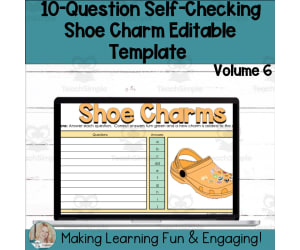
Editable Self-Checking Template - Digital Resource Vol. 6
Resources for Teachers, Classroom Management, Not Grade Specific, Templates, Teacher Tools
Editable Self-Checking Template - Digital Resource Vol. 6 Are you an educator looking for a technique that has the mastery of self-grading, self-checking, and immediate feedback for your students? Look no further than the Editable Self-Checking Template - Digital Resource Vol. 6! This digital interactive tool is pre-formulated and absolute user-friendly; all you need to do is incorporate your content and answers into the customizable area. This resource features a unique mechanism: when students answer questions correctly in this mind-jogging activity , their response turns green while an exciting shoe charm pops up on their screen. However, if answered incorrectly, their answer turns red as an indication that they need to revise. Consisting up-to two answers acceptability feature in its formulated spreadsheet this ivory-tower resource can be seamlessly integrated with any subject area or grade level. The template provides you with space for ten questions per sheet - enough to test basic concepts while engaging learners' interest. A notable feature of this resource clarity and handiness is it comes with detailed instructions both written and video form making it suitable even for those less tech-savvy educators or parents teaching at home who don't have time to learn elaborate setups or intricate programs. Use of Google Sheets The best thing about using Google Sheets? It’s free! All you need is a Google account (also free!), incorporate your content, carry out simple protections procedures as instructed then voila! You're ready to assign interactive self-checking activities right away! This Tool Is Ideal For... Educators seeking novel ways to captivate students’ attention to making lessons lively Teachers needing different methods of differentiation and scaffolding for various learning styles in their classrooms will appreciate its flexibility. Educators interested in classroom management tools that support student autonomy. Therefore, whether you are interested in classroom management tools that support student autonomy or engaging activities used in traditional classroom settings, homeschooling or virtual classrooms; this template offers a versatile solution. Moreover, if you are an educator creating engaging and effective resources for others in your profession — you can't let this opportunity pass to elevate teaching and learning experience. Enjoy less prep time and more 'aha' moments with your students! .
Author Digitally Yours Shop
Tags Interactive, Self-checking, Digital Resource, Immediate Feedback, Customizable

Editable Self-Checking Template - Digital Resource Vol. 4
Resources for Teachers, Classroom Management, Not Grade Specific, Templates, Teacher Tools
Editable Self-Checking Template - Digital Resource Vol. 4 Editable Self-Checking Template - Digital Resource Vol. 4 provides a unique teaching resource, facilitating seamless integration of technology into your curriculum . It promises effective student engagement through interactive learning experiences. Flexible User-friendly Design This product comprises a fillable template compatible with Google Sheets that can be customized for any subject area, catering to diverse grade levels. Also referred to as Shoe Charms Template Vol. 4, it allows the creation of self-grading activities encompassing up to ten questions each. An Immediate Feedback Mechanism The distinct feature involves immediate feedback – answers coded green for accuracy and red otherwise. This color-coding facilitates students' instant review and revision in case of errors, thereby enhancing learning retention. A charm gets added onto an interactive graphic shoe image for every correct answer, providing fun-filled positive reinforcement. Ease of Use & Accessibility: Assisting Teachers’ Workload No hefty preparation needed! Input lesson-aligned content into predefined slots within this template; perform some protective formatting steps; digitally assign tasks via any learning management system or even email! Multipurpose Utility: Beyond Formal Classroom Teaching The practicality of Editable Self-Checking Template extends across homeschooling by parents or alternative pedagogical methods devised by private tutors. This resource: Caters towards individual learning preferences effectively, Navigates across devices/platforms, Includes instruction guides, both written and video, Suitable for Classroom Management themes but versatile enough to be adapted across subjects. This resource adds a dash of interactivity to the traditional teaching-learning process.
Author Digitally Yours Shop
Tags Editable Template, Self-checking, Digital Resource, Interactive Learning, Immediate Feedback