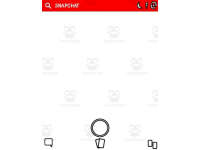
Snapchat Template (Editable on Google Slides)


- Grades
- Not Grade Specific
- Pages
- 13
- File type
- Multiple File Types
- Editable
- Yes


- Subject
- ELA, Writing
- Topic
- Social media, Google classroom
- Resource types
- Templates
- Editable
- Yes
Product description
From the author
The use of this Snapchat template is a great way to engage and gain the interest of your students. Best of all, this resource is available in both printable pdf format as well as a Google Slides editable format.
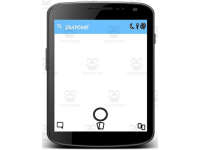
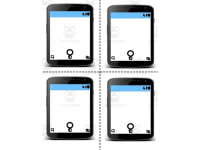
This Snapchat template allows students to create conversations. Included is;
full page view
phone view
four to a page
multiple color options
Some use examples;
Have a conversation between characters in a novel
Have a conversation with a historical person
Have a conversation between friends or family for a creative writing activity
When your students are finished, they can save a picture of their conversation template.
Related resources
More resources teachers may find useful
24 related resources were found using this product's title, contributor, categories and tags.

In the classroom
Teaching tips & learning objectives

Learning objectives
Compose a written dialogue, such as a conversation between two novel characters or with a historical figure, using a chat-message format.

Teaching tips
Choose the phone-view layout for one longer conversation, or the four-per-page layout when several students or groups each need their own copy on a single printed sheet.
Use the "Click here to make a copy" link to add the Google Slides version directly to your Drive, rather than working from the static PDF.
Add your own text boxes or images in the blank area. This classroom template does not require a Snapchat account.

Skills covered
Dialogue writing — students compose a back-and-forth conversation formatted as chat messages, for example between two novel characters or with a historical figure.
Digital template use — students add text boxes to the blank Google Slides layout to enter their dialogue.
Good to know
Questions teachers ask about this resource
How can I connect this to a reading lesson?
Ask students to create dialogue between characters and explain how the conversation fits what they know from the text.

No reviews yet
Downloaded this resource? Tell other teachers how it went.
Resource details
Concepts & topics
Core concepts
 Core concepts
Dialogue writing
Digital template
Creative writing
 Topics
Explore more
Categories this resource belongs to
Explore related searches
More to explore
You may also like